







LinkedIn automation

Automate LinkedIn sourcing.Keep your account safe.

Import any LinkedIn list in bulk, enrich it, and run invites, messages and InMails on autopilot with human-like pacing and daily limits.

Start Free
  • Bulk import any LinkedIn list
  • Invites, messages & InMails
  • Smart throttling & safety limits

ONE CONNECTED WORKSPACE

Every candidate, one connected record.

From first search to placement, candidate details, conversations, notes, deals and pipeline progress stay connected. No separate ATS required.

JE

Jordan Ellis

1st

London, UK

Senior Product Designer

Northwind Labs

Outreach
Email
Phone
Inbox
Notes
DesignReferralAdd tag
Main
Activity
Job application
AI screening
Experience

Senior Product Designer

2021 - Present · 4 yrs

NL
FigmaDesign systemsPrototyping

AI Sourcing

Saved to your shortlist

Added to your CRM only when you choose.

Add to CRM

Email/Phone Enrichment

Enrich contact

Choose work emails, private emails or phone numbers.

Pick what to enrich

AI Screening

AI screening score at 86%

Checks must-haves and nice-to-haves for the job.

Custom criteria

Candidate/Client Lists

Candidate list

Group candidates and clients in their own lists.

Bulk actions

Multi-channel Outreach

Currently in sequence

One sequence across email, LinkedIn and SMS.

Runs on autopilot

Unified Inbox

Open in Inbox

Answer every reply from one inbox.

Auto-tracked activity

ATS/CRM Pipeline & Deals

Interview - Technical

Hiring stages per job, and deals per client.

Synced with sequences

Client/Career Portal

Shared on client portal

Share candidates with clients and collect job applications.

Anonymized profiles

Recognized for excellence

Trusted by 6,000+ users. Recognized across the industry.

Award-winning recruiting software, recognized by Capterra, GetApp and Software Advice.

Award badgeAward badgeAward badgeAward badgeAward badgeAward badgeAward badgeAward badgeAward badgeAward badgeAward badgeAward badgeAward badge

Import. Engage. Stay safe.

LinkedIn automation without the busywork

Every LinkedIn list becomes structured CRM data, and every invite and message runs at a safe, human pace.

Bulk import

Import any LinkedIn list in one click

Pull people from wherever they are on LinkedIn straight into your CRM.

  • Searches, Sales Navigator searches and lead lists, Recruiter projects.
  • Group members, event attendees, post engagement and newsletter subscribers.
  • Profiles already in your database are skipped or merged automatically.
Profile capture

Capture profiles while you browse

The Jobin browser extension saves complete profiles with one click, or none.

  • 1-click profile import from the Jobin browser extension.
  • Optional 0-click capture of every profile you view.
  • Full profiles with 44+ data fields, kept fresh by automatic resync.

Outreach

Invites, messages and InMails on autopilot

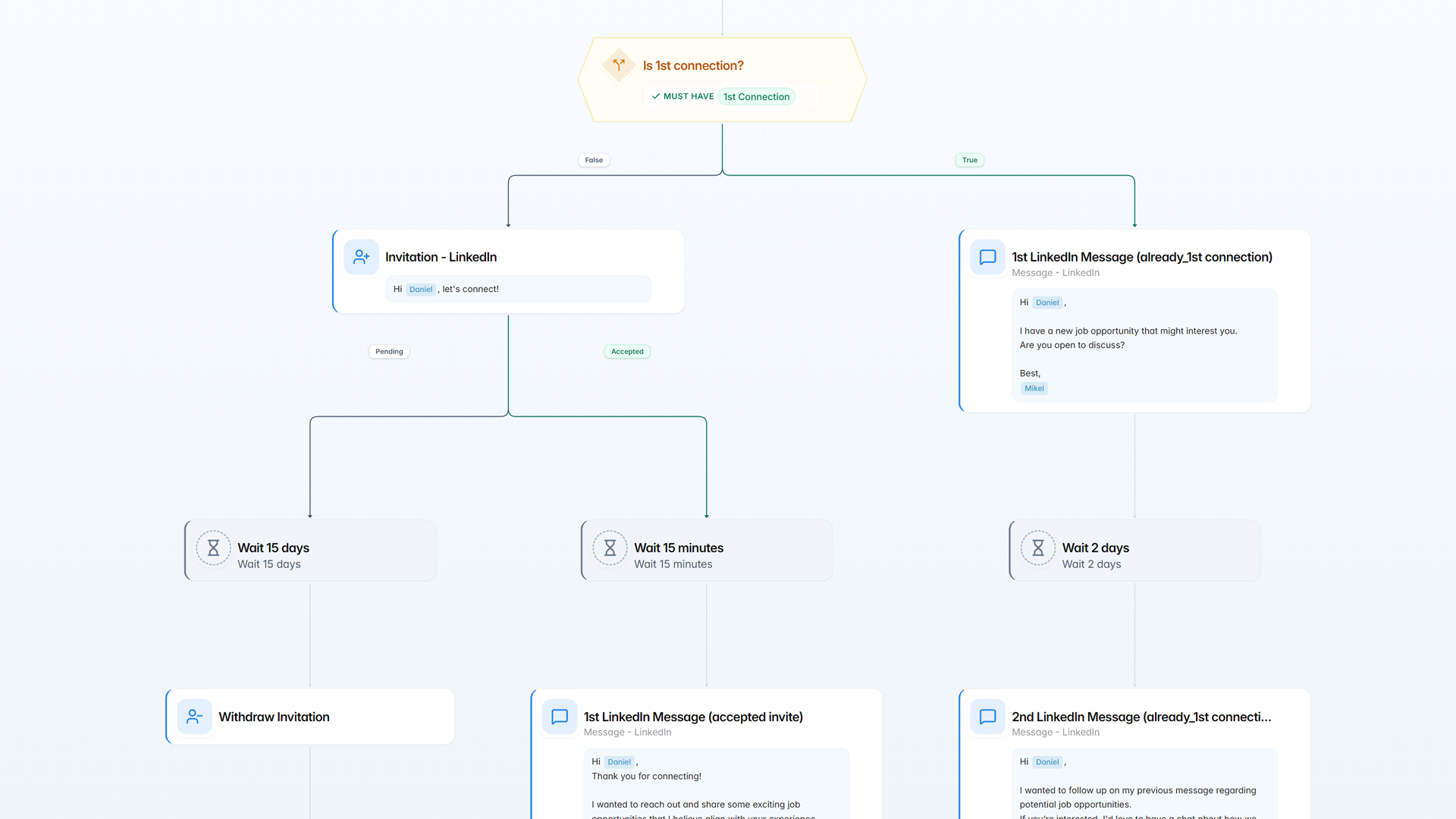
Run LinkedIn steps on their own or inside multi-channel sequences.

  • Bulk connection requests with personalized notes.
  • Follow-up messages and paid or free InMails in sequences.
  • Auto-withdraw pending invites to keep your invite quota healthy.
LinkedIn outreach sequence

Safety

Human-like pacing that protects your account

Limits and monitoring are built in, not bolted on.

  • Daily limits and smart throttling per LinkedIn account.
  • Operations monitor to review, retry and prioritize actions.
  • LinkedIn-only seats for teammates and connected accounts.
Operations monitor for queued LinkedIn actions

10 tools for the price of 1

LinkedIn Automation is one part of the Jobin.cloud suite

Use LinkedIn Automation on its own, or add the rest of the recruiting stack on the same self-updating contact records, timeline and credit balance.

Customer stories

Trusted by recruiters who know what works.

Real teams. Real results. Hear from recruiters using Jobin every day.

Stellar Business Tool

Everything you need all in one platform!

Great so far! I look forward to implementing the features in growing our business.

Mark H. avatar

Mark H.

Partner - Staffing and Recruiting

Read on Capterra

FAQ

LinkedIn automation questions

Quick answers about LinkedIn Automation in Jobin.cloud.

How does Jobin.cloud keep LinkedIn automation safe?

Jobin.cloud applies daily limits, smart throttling and human-like pacing per connected LinkedIn account, and every queued action is visible in the Operations Monitor where it can be paused, retried or reprioritized.

Which LinkedIn lists can I import?

LinkedIn searches, Sales Navigator searches and lead lists, LinkedIn Recruiter searches and projects, group members, event attendees, post engagement, newsletter subscribers, 1st-degree connections and company employees.

Does it work with Sales Navigator and LinkedIn Recruiter?

Yes. Jobin.cloud works alongside Sales Navigator and LinkedIn Recruiter by importing their searches and lists into your CRM, then automating outreach from there.

How much does LinkedIn automation cost?

LinkedIn Automation is available as a standalone product with plans starting at $8.99/user/mo, or as part of the All-in-One Suite.

Jobin.cloud

candidate record

AI Sourcing

Email/Phone Finder

AI Screening

Multi Outreach

Unified Inbox

Pipeline

Your next placement starts here

Less busywork.More placements.

Find the candidates others miss, engage them on every channel, and place them from one workspace.

Free to start, live in minutes.