









Recruitment CRM

A CRM built for recruitment.With built-in MPC workflows.

Jobin connects candidates, clients, jobs and placements. Win new clients by offering them a real candidate, and run business development and delivery on the same records.

Start Free
  • MPC deals that win new clients
  • Candidates, clients, jobs & deals linked
  • Self-updating contact records

Recruitment CRM vs generic CRM

What a recruitment CRM does differently

Recruitment has two sides, candidates and clients, connected by jobs. Jobin models both from the start, so every record arrives ready for how agencies work.

TopicTypical generic CRMJobin.cloud
Who you trackTypical generic CRM: Leads, contacts and companiesJobin.cloud: Candidates, client contacts and prospects, with dedicated views on the same records
PipelinesTypical generic CRM: Sales pipelines for dealsJobin.cloud: Job pipelines for candidates and sales pipelines for client deals, linked together
Getting data inTypical generic CRM: Manual entry or CSV importJobin.cloud: LinkedIn, Sales Navigator and Recruiter imports, bulk CV parsing and live profile updates
DealsTypical generic CRM: A value and a stageJobin.cloud: Deals linked to jobs, candidates and placements, with weighted forecasts
Business developmentTypical generic CRM: Pitching your agency’s servicesJobin.cloud: MPC Deals: offer a real candidate to target companies, with the expected fee calculated
Working with clientsTypical generic CRM: Email attachments and spreadsheetsJobin.cloud: A Client Portal where clients review and score candidates on weighted scorecards
OutreachTypical generic CRM: Email sequences to leadsJobin.cloud: Email, LinkedIn, SMS and calls; replies move candidates to the next stage
ReportingTypical generic CRM: Sales activity and revenueJobin.cloud: Time to fill, stage conversion, placements and recruitment revenue

ONE CONNECTED WORKSPACE

Every candidate, one connected record.

From first search to placement, candidate details, conversations, notes, deals and pipeline progress stay connected. No separate ATS required.

JE

Jordan Ellis

1st

London, UK

Senior Product Designer

Northwind Labs

Outreach
Email
Phone
Inbox
Notes
DesignReferralAdd tag
Main
Activity
Job application
AI screening
Experience

Senior Product Designer

2021 - Present · 4 yrs

NL
FigmaDesign systemsPrototyping

AI Sourcing

Saved to your shortlist

Added to your CRM only when you choose.

Add to CRM

Email/Phone Enrichment

Enrich contact

Choose work emails, private emails or phone numbers.

Pick what to enrich

AI Screening

AI screening score at 86%

Checks must-haves and nice-to-haves for the job.

Custom criteria

Candidate/Client Lists

Candidate list

Group candidates and clients in their own lists.

Bulk actions

Multi-channel Outreach

Currently in sequence

One sequence across email, LinkedIn and SMS.

Runs on autopilot

Unified Inbox

Open in Inbox

Answer every reply from one inbox.

Auto-tracked activity

ATS/CRM Pipeline & Deals

Interview - Technical

Hiring stages per job, and deals per client.

Synced with sequences

Client/Career Portal

Shared on client portal

Share candidates with clients and collect job applications.

Anonymized profiles

Recognized for excellence

Trusted by 6,000+ users. Recognized across the industry.

Award-winning recruiting software, recognized by Capterra, GetApp and Software Advice.

Award badgeAward badgeAward badgeAward badgeAward badgeAward badgeAward badgeAward badgeAward badgeAward badgeAward badgeAward badgeAward badge

Candidates. Clients. Placements.

Built around candidates, clients and placements

Jobs, candidates, client deals and placements are built-in records in Jobin, connected from the start.

Candidates & clients

Both sides of recruitment in one database

Dedicated views for candidates, clients and prospects, all on the same contact records, refreshed with each person’s latest role and company.

  • Dedicated Candidate, Client and Prospecting CRM views.
  • Live profile updates refresh roles, companies and locations in bulk.
  • Duplicates merge automatically and missing fields fill in over time.
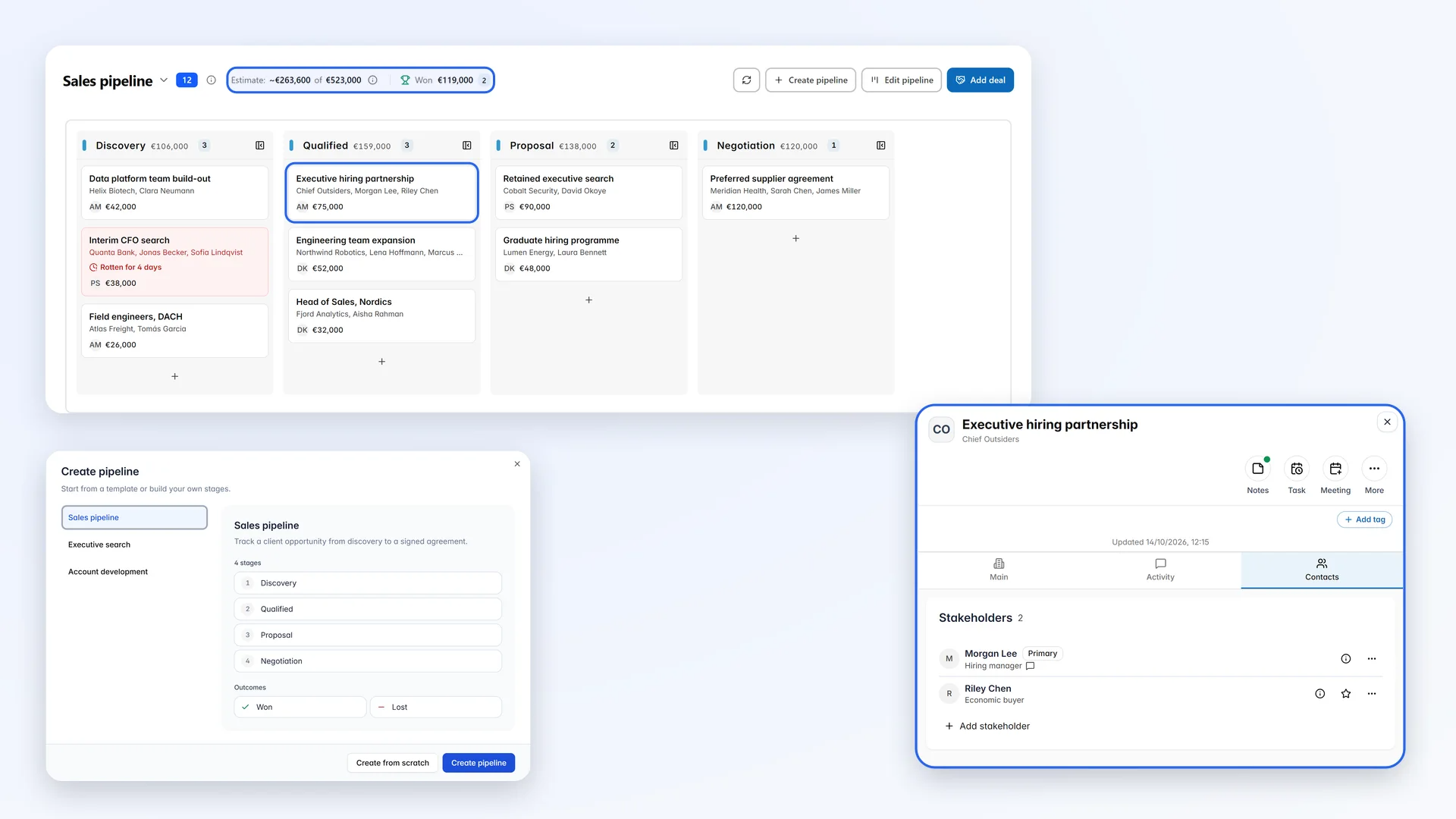
MPC marketing

Win new clients by offering a real candidate

Start every business development conversation with a standout candidate to offer. Market your most placeable candidates (MPCs) to target companies and track every pitch as a deal.

  • One MPC Deal per target company, so one candidate can open many doors.
  • Expected fee calculated from the candidate’s desired salary and your fee.
  • A ready-made MPC pipeline, from target company identified to job order sent for signature.
  • Client deals alongside, with win probabilities, stalled-deal alerts and weighted forecasts.
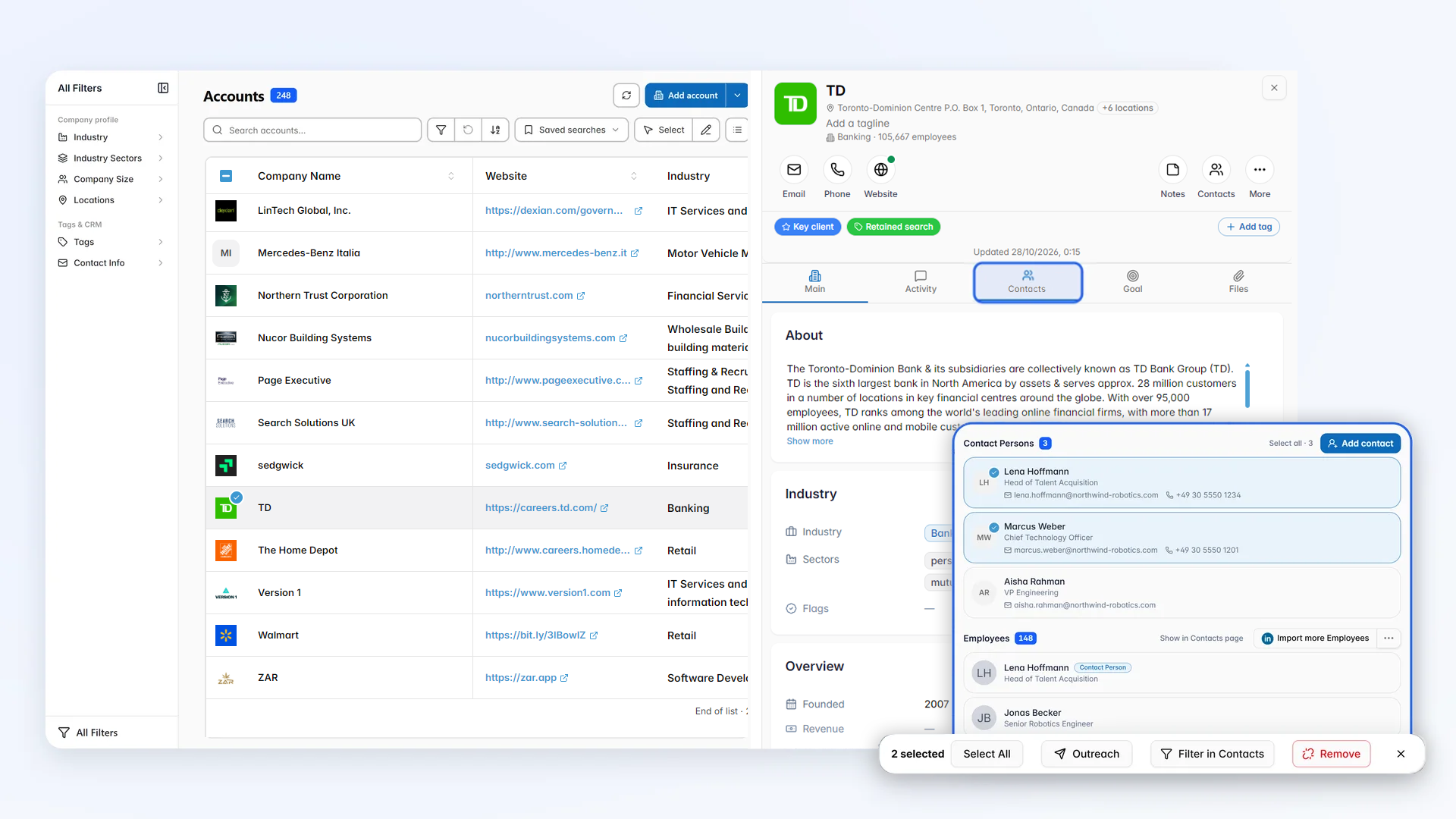
MPC deals in the Jobin.cloud sales pipeline

Accounts

Every client company in one account profile

See a client’s contacts, jobs, deals, documents and tasks in one place.

  • Client accounts with their contacts, jobs, deals and documents.
  • Import companies from LinkedIn or CSV with tags applied.
  • Track tasks directly from Jobs, Accounts and Contacts.
Client account profile in Jobin.cloud

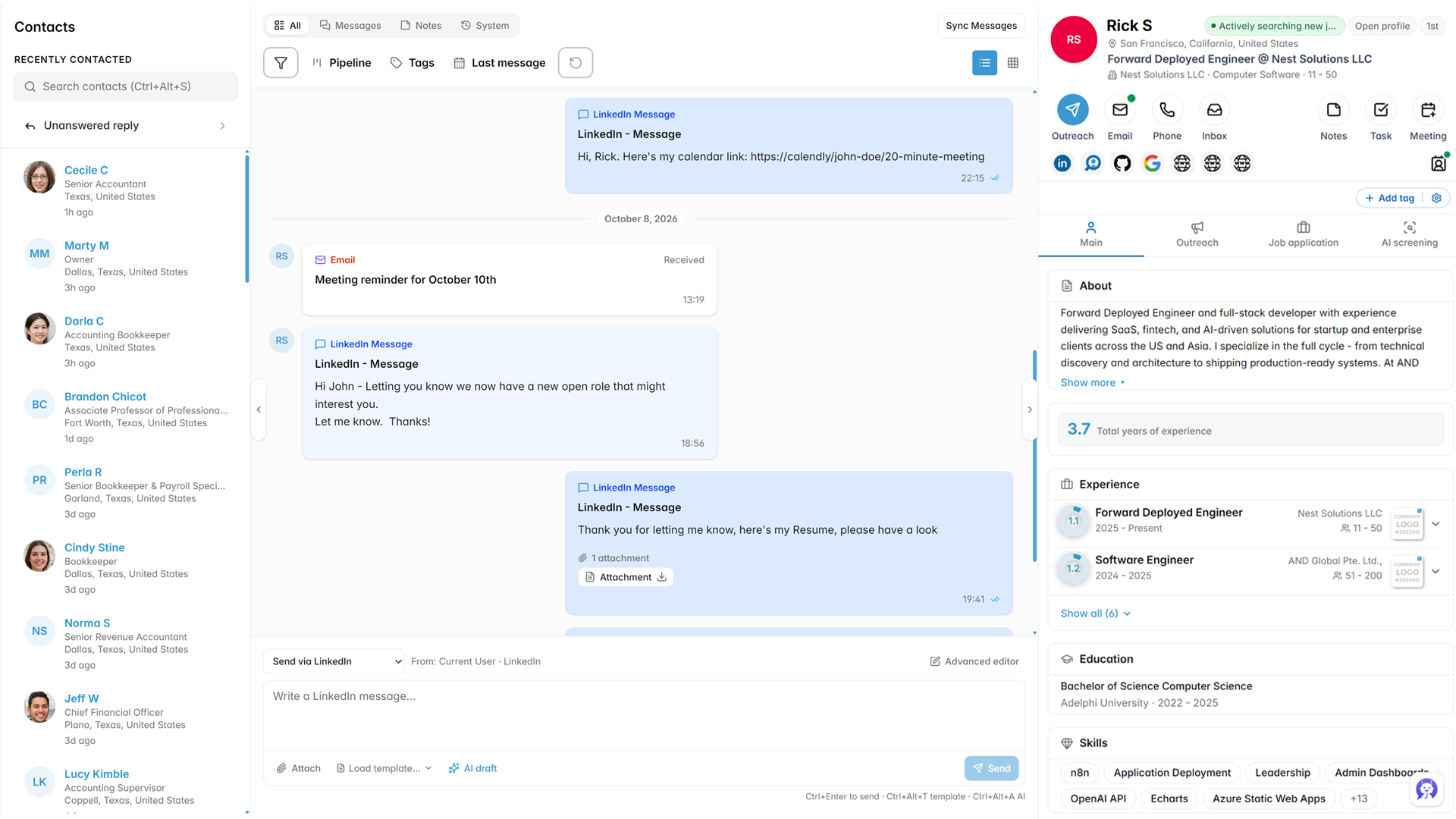
Timeline & tasks

Every conversation on one timeline

Every touchpoint lands on the contact timeline, and the next step lands in a task queue.

  • Email, LinkedIn, SMS, calls and meetings on one interaction timeline.
  • Task queues with call outcomes and scheduled callbacks.
  • Google and Microsoft calendar sync for meetings.
Task queues and interaction timeline

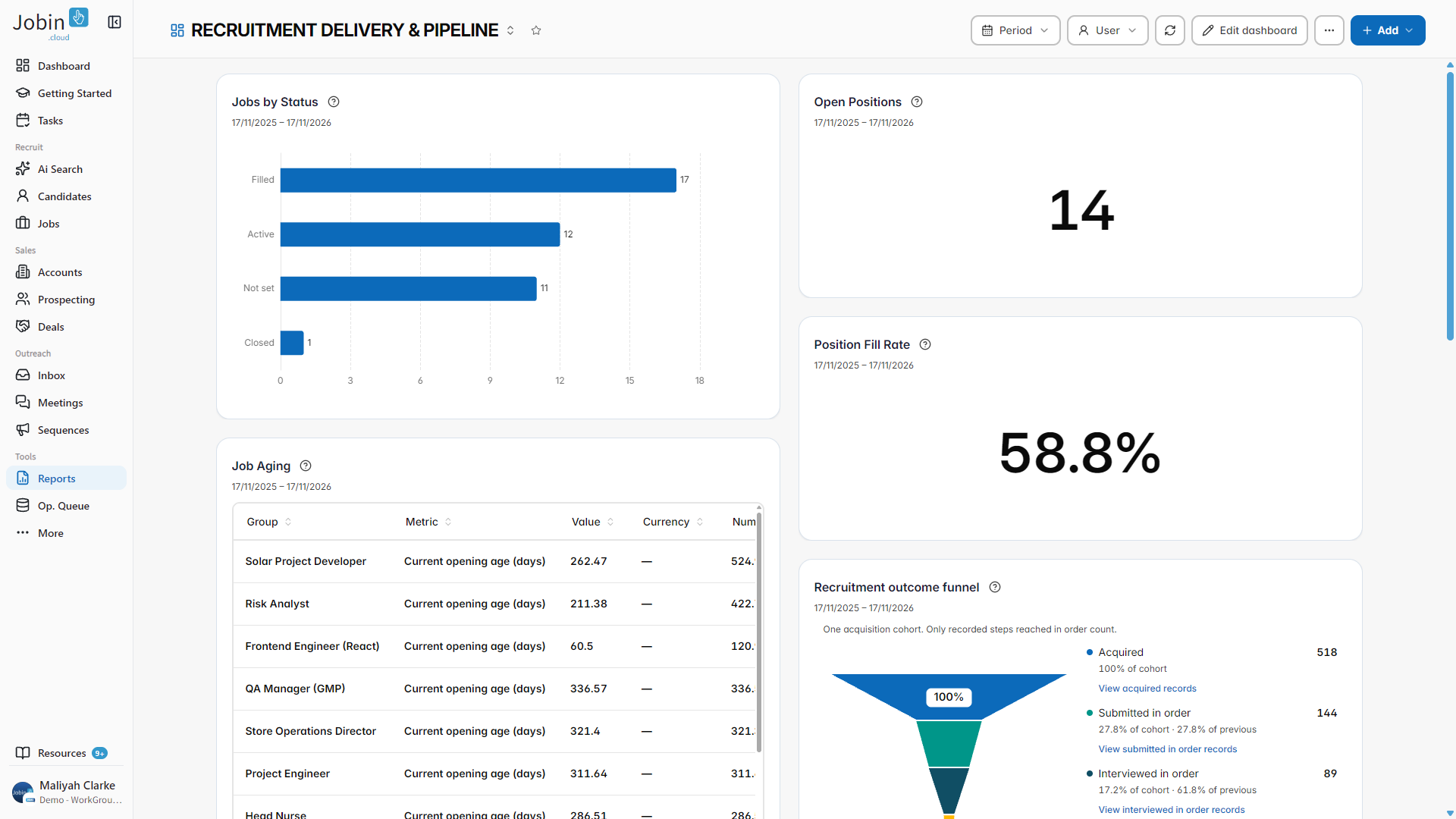
Recruitment reports

Recruitment metrics, built in

Reports update from the jobs, deals and placements your team already records.

  • Time to fill, stage conversion and placements per job.
  • Sales forecasts and recruitment revenue.
  • Goals, team activity and AI-generated custom reports.
Recruiting and revenue reports

10 tools for the price of 1

CRM is one part of the Jobin.cloud suite

Use CRM on its own, or add the rest of the recruiting stack on the same self-updating contact records, timeline and credit balance.

Customer stories

Trusted by recruiters who know what works.

Real teams. Real results. Hear from recruiters using Jobin every day.

Stellar Business Tool

Everything you need all in one platform!

Great so far! I look forward to implementing the features in growing our business.

Mark H. avatar

Mark H.

Partner - Staffing and Recruiting

Read on Capterra

FAQ

Recruitment CRM questions

Quick answers about CRM in Jobin.cloud.

What is a recruitment CRM?

A recruitment CRM manages relationships with candidates and clients over time. Jobin.cloud combines a candidate CRM, a client CRM with accounts and deals, and an ATS, so business development and delivery share the same data.

How is a recruitment CRM different from a generic CRM like HubSpot or Salesforce?

Generic CRMs are built around one buyer and one sales pipeline, so recruiters end up rebuilding candidates, jobs and placements with custom fields. Jobin.cloud is built for recruitment: candidates, client contacts, jobs, deals and placements are built-in, connected records, with job pipelines, a Client Portal, LinkedIn and CV imports, and reports such as time to fill and recruitment revenue.

What is MPC marketing, and how does Jobin.cloud support it?

MPC stands for most placeable candidate: a standout candidate you present to companies that could hire them, so business development starts with a real person to offer. In Jobin.cloud you create one MPC Deal per target company from the candidate’s profile. The expected fee is calculated from the candidate’s desired salary and your fee percentage (20% to start, editable), a ready-made MPC pipeline runs from target company identified to job order sent for signature, and the candidate stays a candidate rather than becoming a client contact.

Can Jobin.cloud replace HubSpot or Pipedrive for agency business development?

For recruitment business development, yes. Jobin.cloud tracks client accounts, contacts and deals in sales pipelines with win probabilities, stalled-deal alerts and forecasts, and links each deal to jobs, candidates and placements.

Does the CRM keep candidate data up to date?

Yes. Live profile updates fetch each contact’s latest role, company and location in bulk for any selection or saved search, without re-importing. Duplicates merge on import, and enrichment adds missing emails and phone numbers from 20+ data providers, so you always reach people where they work today.

Is there a free recruitment CRM plan?

Yes. The free plan includes the ATS/CRM workspace; paid ATS / CRM and All-in-One plans add higher limits and automation. See CRM pricing for details.

Jobin.cloud

candidate record

AI Sourcing

Email/Phone Finder

AI Screening

Multi Outreach

Unified Inbox

Pipeline

Your next placement starts here

Less busywork.More placements.

Find the candidates others miss, engage them on every channel, and place them from one workspace.

Free to start, live in minutes.