
All-in-one recruitment agency software
Jobin.cloud is recruitment agency software that runs sourcing, outreach, team collaboration, and ATS/CRM workflows in one platform, built for recruitment and staffing agencies with high-volume hiring and long-term candidate relationships. Review pricing, explore ATS and CRM features, or see how RPO software runs a workgroup per client.

Why recruitment agencies run their desks on Jobin.cloud
Sourcing Automation · Talent Search and automatic Outreach
- Search and import full candidate profiles from LinkedIn
- Easily source from LinkedIn Groups, Events, Posts or Searches
- Filter and extract contact details (Email, Tel., Social) and auto-enrich profiles
- Use Candidate scoring both in filters and automatically run in your funnels
- Integrated X-Ray searches for advanced multi-website searches
- Reach out to anyone and quickly expand your LinkedIn network in bulk with automated connection invitations with personalizable auto-compiling notes
- Set automated follow-ups with personalizable templates
- Bulk personalizable LinkedIn outreach for direct messaging, and inMails
- Bulk emailing with custom templates, and attachments (videos, documents, etc.)
- Auto-tracked interaction timelines with messages and events of each contact
- Easily map your Recruitment workflow with customizable Job pipelines
- Bulk withdraw old pending connection invitations
- Automated 1st connection import facilitate managing your network
Explore the features
Everything recruitment agencies need, in one workflow
From sourcing at volume to client delivery and reporting, every feature your agency runs on.
Source at volume
Give every consultant the same sourcing power.
AI candidate search
Let every consultant run AI research across 2.5+ billion profiles for each new vacancy.
Have AI scan and research through a massive aggregated repository of profiles from a multitude of available internet sources all around the world.
Simply describe what you're looking for or paste in a Job description and the AI's research does the rest - you can then fine-tune manually as well.
- No geographical or industry limitations.
- Each found result is updated in real-time to ensure you have the latest data.
- The AI's research will also generate more advanced criterion-based searches as opposed to the more limited keyword-based searches, allowing you to keep searches both very broad and very targeted at the same time!
- Roles, skills, languages, and locations are expanded automatically, and a language or location can be set as a requirement.
- See why each candidate matches, and use your CRM context to hide people you already know or have contacted.
Once imported, results will also often include contact details like emails and phone numbers, allowing you to easily get in touch, as well as their social profile URLs, making it easy to connect with prospects on social media.
You can also have AI screen and write a report about the results it finds so that you don't need to manually look through them to find more nuanced requirements that filters normally miss out on. AI screening also works on any segment already in your CRM.
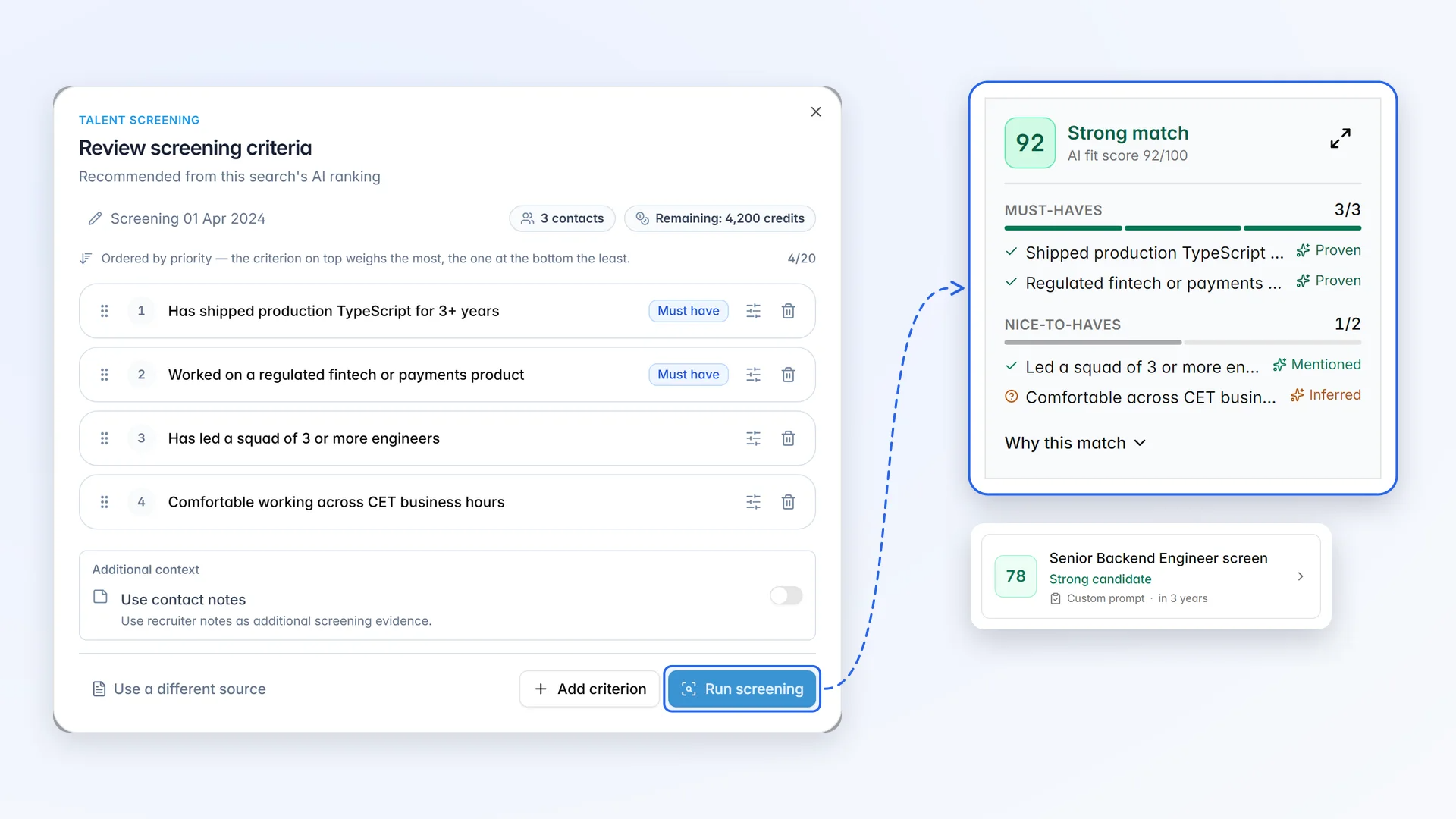
On-demand AI screening
Screen large candidate lists against each client’s nuanced requirements before a consultant spends time on them.
Some requirements never appear as a clean keyword: a hard-to-find specialism, a culture fit, or a concept described in a dozen different ways. Instead of reading every profile by hand, have AI screen them for you.
- Screen any group of candidates: a selection, a filtered segment, a tag, a shortlist, or a whole job pipeline
- Generate up to 20 criteria from a prompt, a job description, or an existing job, then set each one as a must-have or a nice-to-have, with categories such as culture fit, soft skills, or technical skills
- Get an AI fit score for every candidate, with each criterion marked as proven, mentioned, inferred, or missing
- Keep working while it runs, then review the results in Contacts alongside your usual filters
Ideal Candidate and Profile matching
Rank your agency’s whole database against each vacancy, so past candidates are found before you source new ones.
Recruiters strive to quickly find top candidates.
Having filtering systems pre-scan massive datasets is essential to reduce time-to-hire and efficiently find the best candidates for the job.
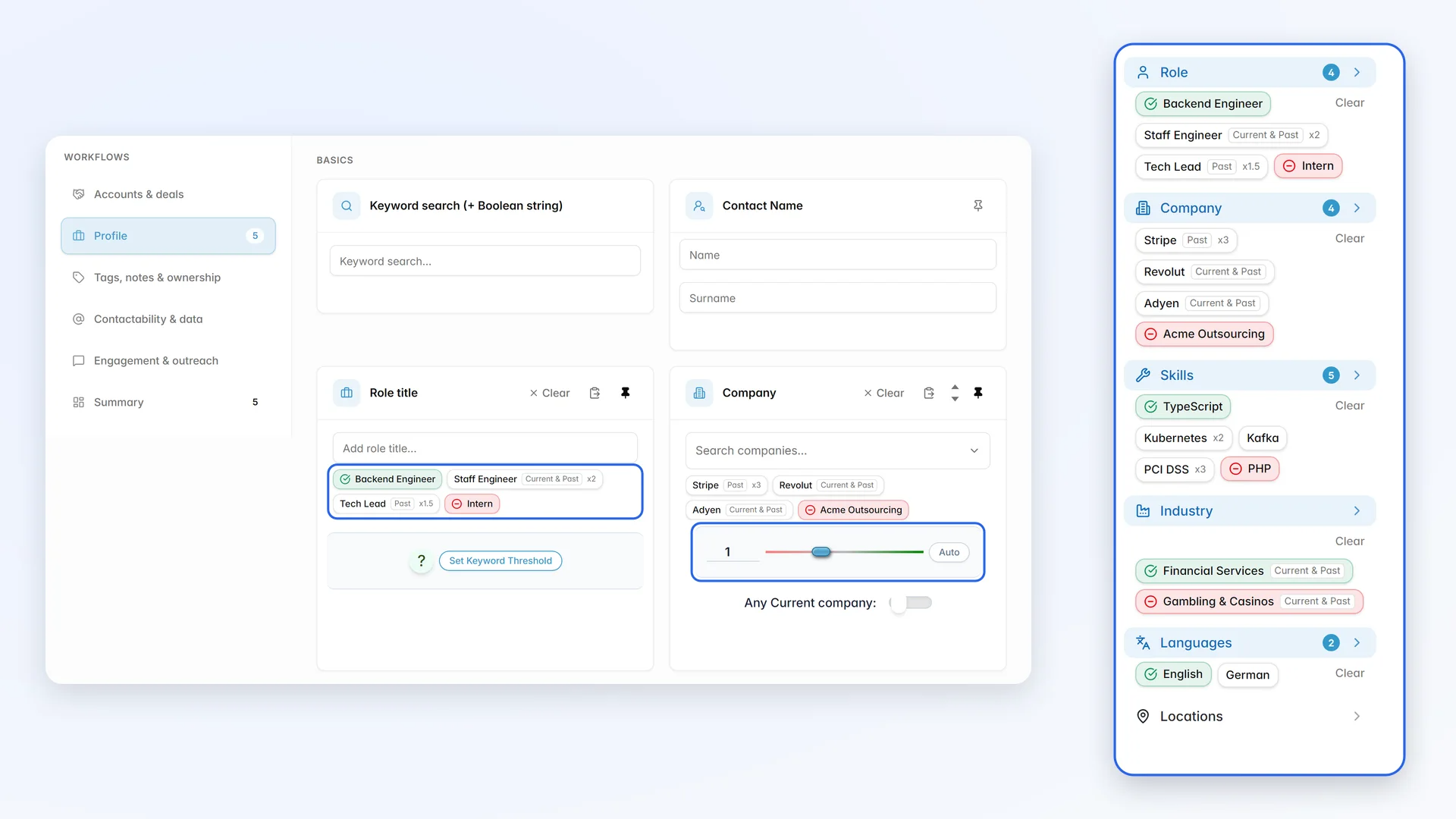
Jobin supports you in that, accommodating not only traditional boolean searches but also advanced ranking systems that create a "fitting index" of each contact, providing a fully ordered contact list, from most fitting to least fitting.
Jobin.cloud filters have 3 commands:
- Must have criteria (green)
- Excluded criteria (red)
- Optional criteria (light-blue)
Role, company, and industry criteria can match a contact's current job, past jobs, or both.
Optional criteria aren't mandatory and therefore allow you to rank your contacts, granting enhanced filter flexibility thanks to
Geographic Search
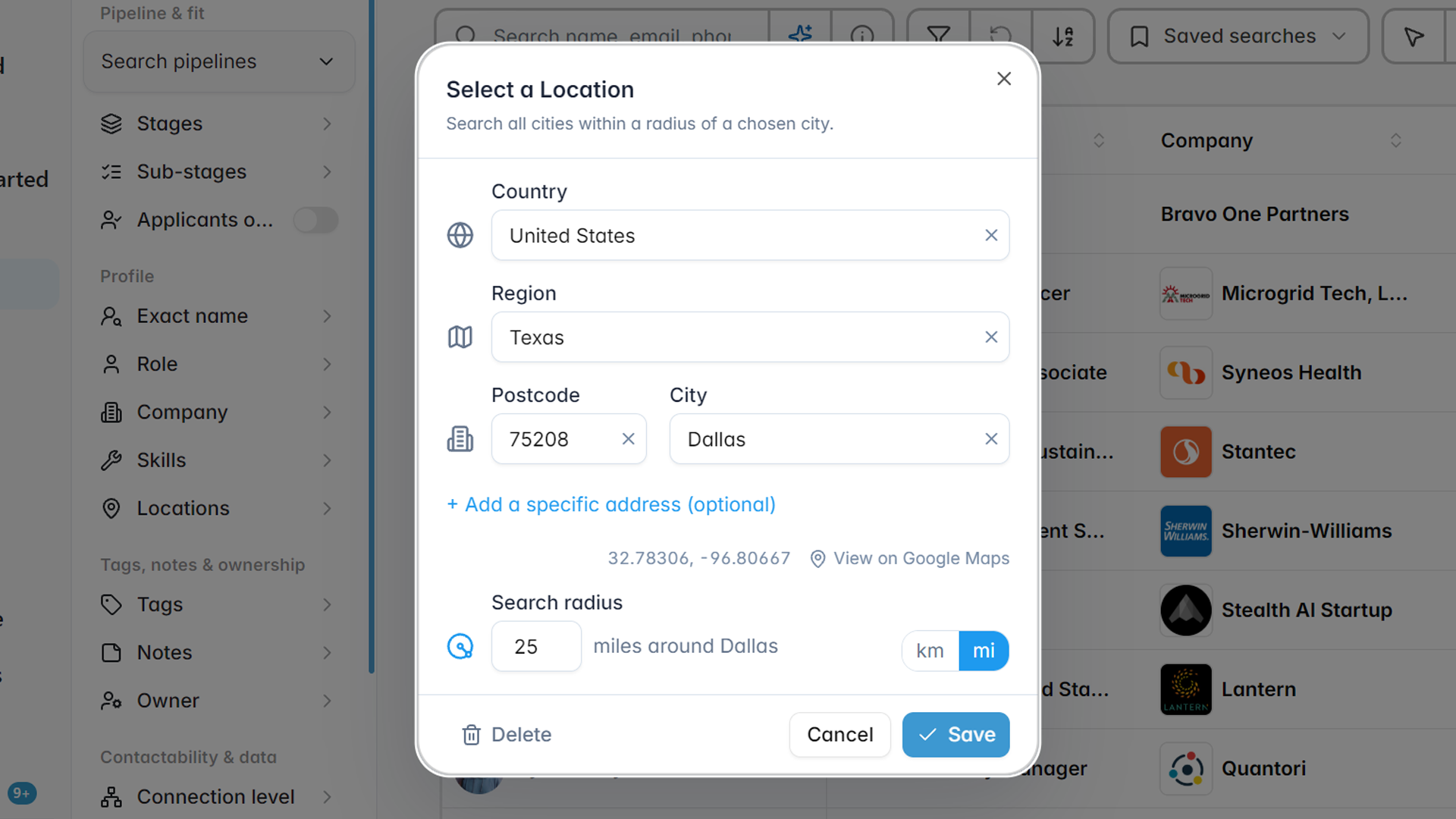
Search by radius around each client’s office, including small towns that location keywords miss.
Profiles containing names of minor towns, suburbs and villages are very difficult to find with conventional location filters, and typing out long lists of names just to search in larger geographic areas is rarely worth the effort.
Jobin allows you to define a central location (a City) and a radius in miles (or km) around it, so only 1 name is necessary to include any amount of towns around it. Furthermore, if given the chance, Jobin will:
- Auto-compile Countries
- Auto-compile Postcodes
- Auto-compile Regions
Allowing for easy filtering of pre-defined areas.
Automated LinkedIn profile import
Let every consultant save LinkedIn profiles to the shared agency database in one click.
Simplify prospecting efforts by automating LinkedIn profile-searches and imports.
Finding and actively engaging with the right people is the first essential step of any business. However, browsing on social networks tends to be long and frustrating without the support of proper automation.
With the Jobin Extension, any Contact can be instantly imported in full with:
- All Contact Details
- All Summaries, Skills and Accomplishments
- All Professional and Educational Experiences
- LinkedIn subscription, connections and connection level
and much more
Unlimited bulk import in autopilot
Import whole searches, groups, and event attendees into a vacancy pipeline in one go.
Import in FULL (not just Name and Role) hundreds if not thousands of potential leads, in just one click, be it people, or companies.
Remain untracked by LinkedIn, and surpass the limits of what regular users can do.
You can bulk import full profiles, in multiple ways all in 1-click:
- Auto-import all your 1st connections
- Import all 100 pages from any search results
- Import Group members
- Import Event attendees
- Import Post participants
- Import Newsletter Subscribers
- Import Sales Navigator searches and lead lists
- Import LinkedIn Recruiter searches and projects
- Import companies, and the employees of any company
All extracted profiles will be added to a job-spec pipeline
Seamlessly Import without clicking
Capture every profile your consultants view on LinkedIn, so no sourcing effort is lost.
- Do you spend a lot of time browsing on LinkedIn?
- Is manually clicking import too much of a hassle?
Say no more!
After enabling Auto Import, just viewing a profile is enough to fully import them into your Jobin repository.
The import is instant, no need to worry about browsing too fast
Viewed a profile multiple times? Not a problem
Everything gets seamlessly merged, so instead of ending up with duplicates, you've fully updated them instead!
Auto-compiled Google and Bing X-Ray search
Find niche candidates across the web with X-Ray searches built from your filters.
No need to memorize any complicated search string formatting, Jobin does it all automatically for you!
- Required fields
- Excluded fields
- Locations
- Which website
and an extra search string for all the boolean string geeks to freely tweak.
All of this automatically formatted into a Google or Bing X-Ray so that you can quickly find anyone, anywhere.
Bulk CV and resume parsing
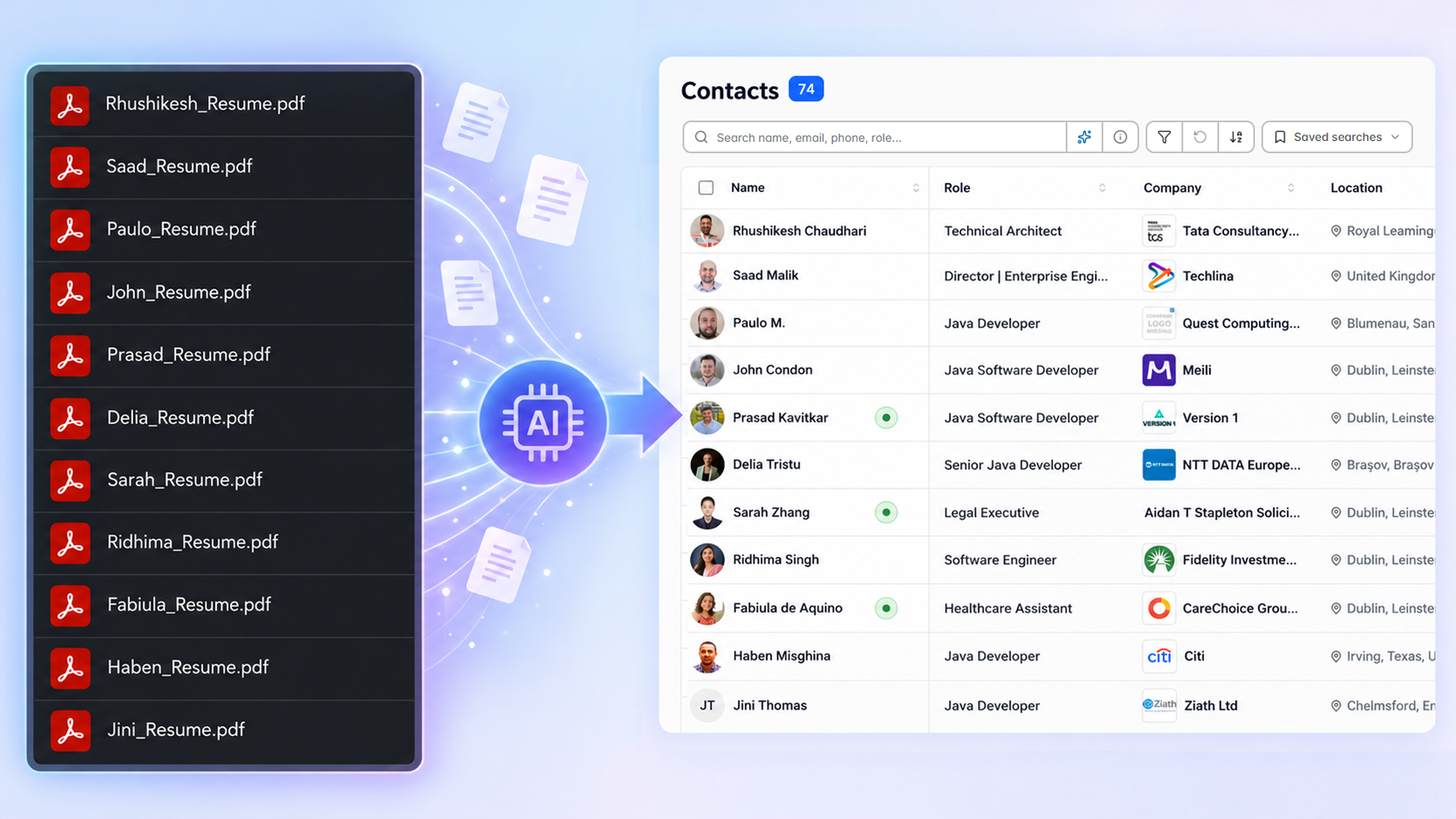
Turn inbound CVs and application folders into searchable candidates in bulk.
Upload one or hundreds of CVs and resumes as PDF, DOC, DOCX, or TXT. AI parsing runs in the background, so you can keep working while candidate records are created.
- Matches CVs to existing contacts instead of creating duplicates
- Assign tags and a recruitment pipeline to every imported candidate
- Parse the CVs that arrive with job applications
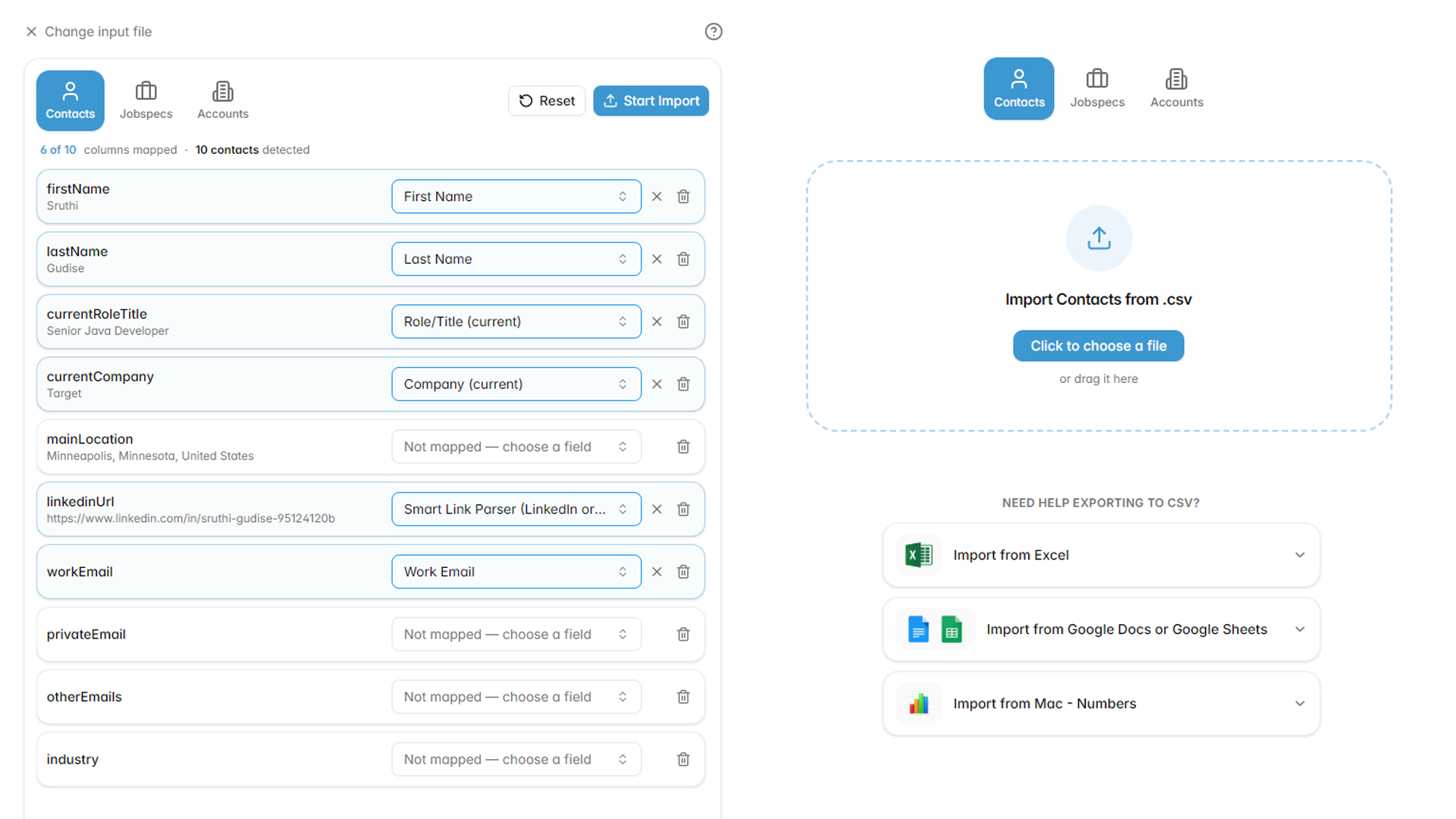
Data migration and CSV import made simple
Migrate your agency off its old ATS and spreadsheets into one clean, shared database.
Moving off an old ATS, or pulling together data scattered across spreadsheets and tools, usually means expensive data engineering. In Jobin, any CSV file of candidates, jobs, or client accounts can be mapped and imported in a few clicks, including into the custom fields that are specific to your process.
- Map columns to Jobin fields or to your own custom fields, create a new field on the spot, or set one value for every imported row
- Common headers are recognized automatically, and your mappings are remembered for the next similar file, so you only map a format once
- A Smart Link Parser reads profile links and websites in any format
- Decide what happens on conflicts: overwrite with newer data, ask first, or keep what you have
- Tag every imported record and review how many are ready before anything is written
Engage candidates
Run outreach as a team, on every channel.
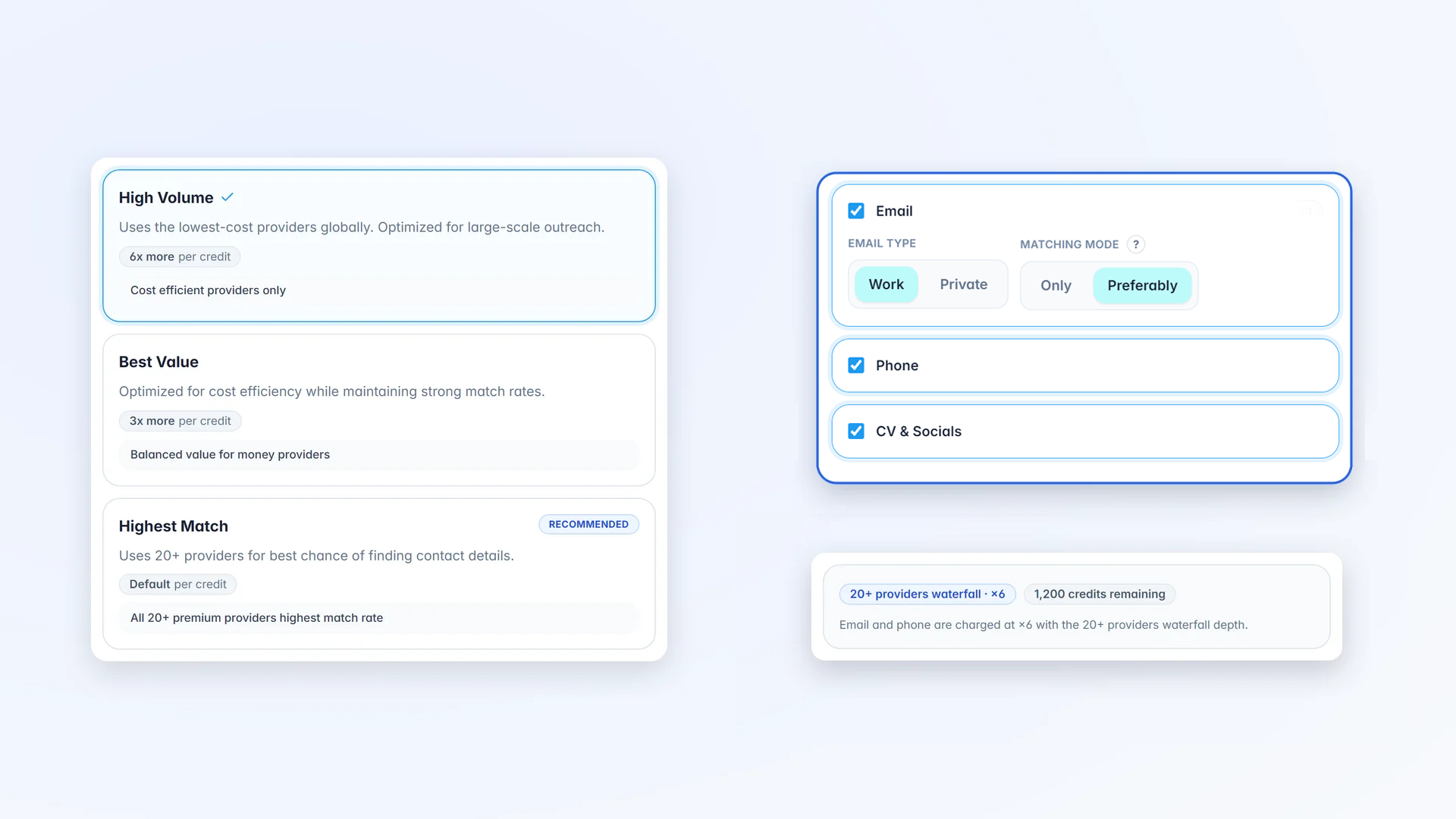
Email finder and Profile Enrichment
Find emails and phone numbers for whole shortlists, so consultants spend time talking, not searching.
LinkedIn profiles are definitely rich with useful information, but not always do they have everything; more often than not, emails, phone numbers, and other social media profiles are kept private or not mentioned.
Reach over 900M contact details with the press of a button:
- Business and private email addresses
- Landline and mobile phone numbers
- Other social media profile urls
No need to monotonously click to scan for the contact details either:
- Enrich contacts in bulk in just one click
- Auto enrich contacts in your email campaign, choosing exactly what each step should find: email, phone, or both
- Keep working while enrichment runs in the background
Easily find everyone you can contact
Filter any talent pool down to the candidates your team can contact right now.
Having lots of contacts is nice, but if you can't easily contact them, then what's the point?
Jobin is well aware of its importance, that's exactly why we've built a dedicated filter, for just that.
All filters have their own exclude counterpart, ranging from:
- Mobile phone number
- Landline phone number
- Internet site
- Social media
Multi-channel Outreach Campaigns
Run LinkedIn and email sequences for every vacancy from one place.
Engage with prospects, simultaneously, and automatically
- Increase reach and diversify communication: People have different communication preferences, by combining both email and LinkedIn you can reach wider audiences and increase chances of connecting with potential prospects.
- Personalization: Thanks to Jobin.cloud's adaptive sequence condition operations, you can personalize your outreach efforts even further. For example, you can mention sending a LinkedIn connection request in your email or mention specific actions you've taken earlier within the drip sequence.
Every action is automatically recorded in a practical interactions timeline for each profile.
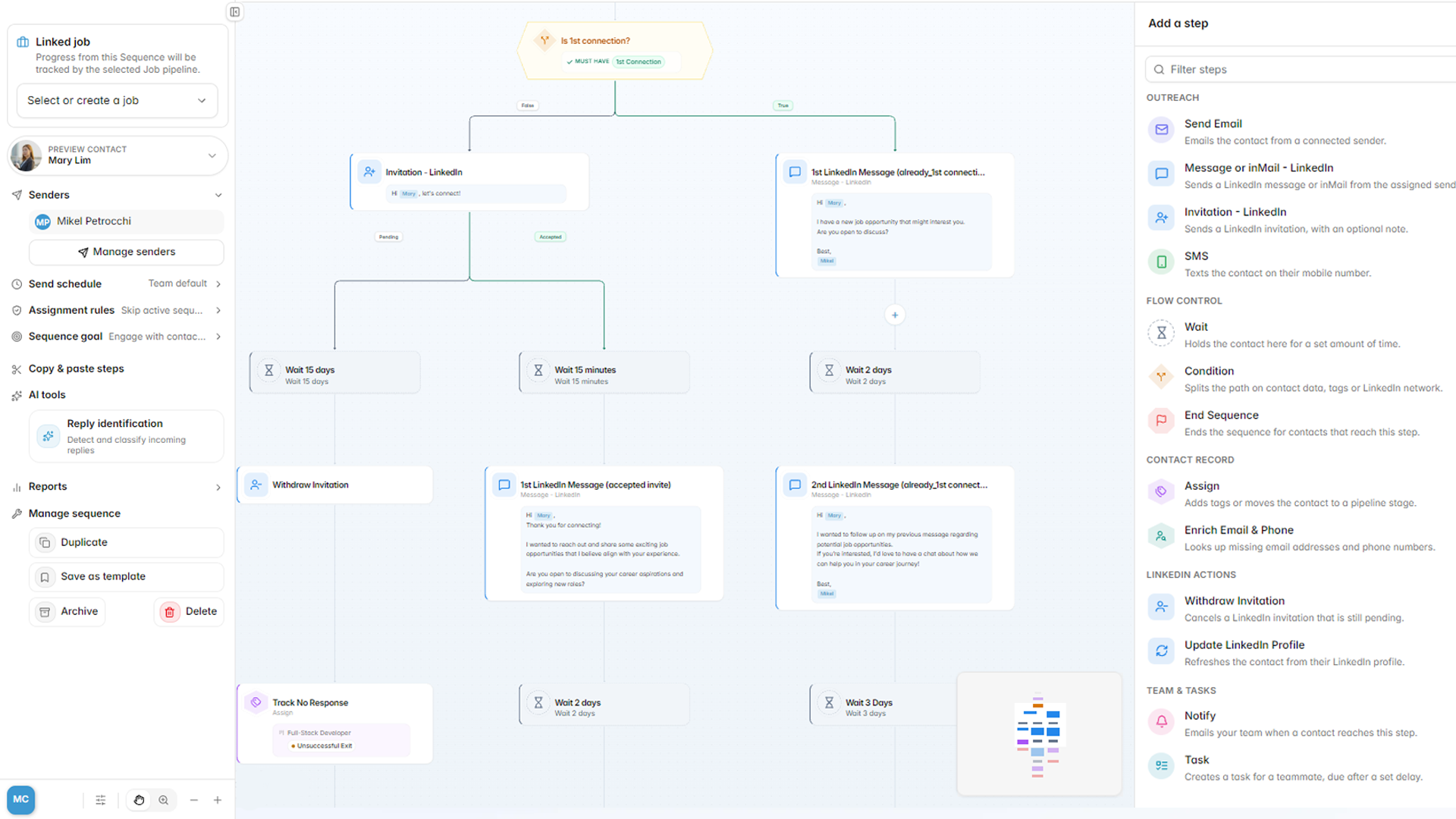
AI Sequence builder and smart sequences
Draft a new outreach sequence for each vacancy in minutes with AI.
Tell Jobin what you want to achieve, such as booking intro calls with senior engineers, and AI creates the sequence steps and messages for you to review.
- Conditions that branch on what each contact did
- AI reply intent recognition that moves contacts to the right stage or next sequence
- Enrichment steps that find exactly the contact details a step needs
- Manual task steps for calls and personal touches
- Scheduled start times, and edits that reach contacts already in the sequence
- Pause a sequence and every scheduled step stops at once; resume it and contacts carry on where they were
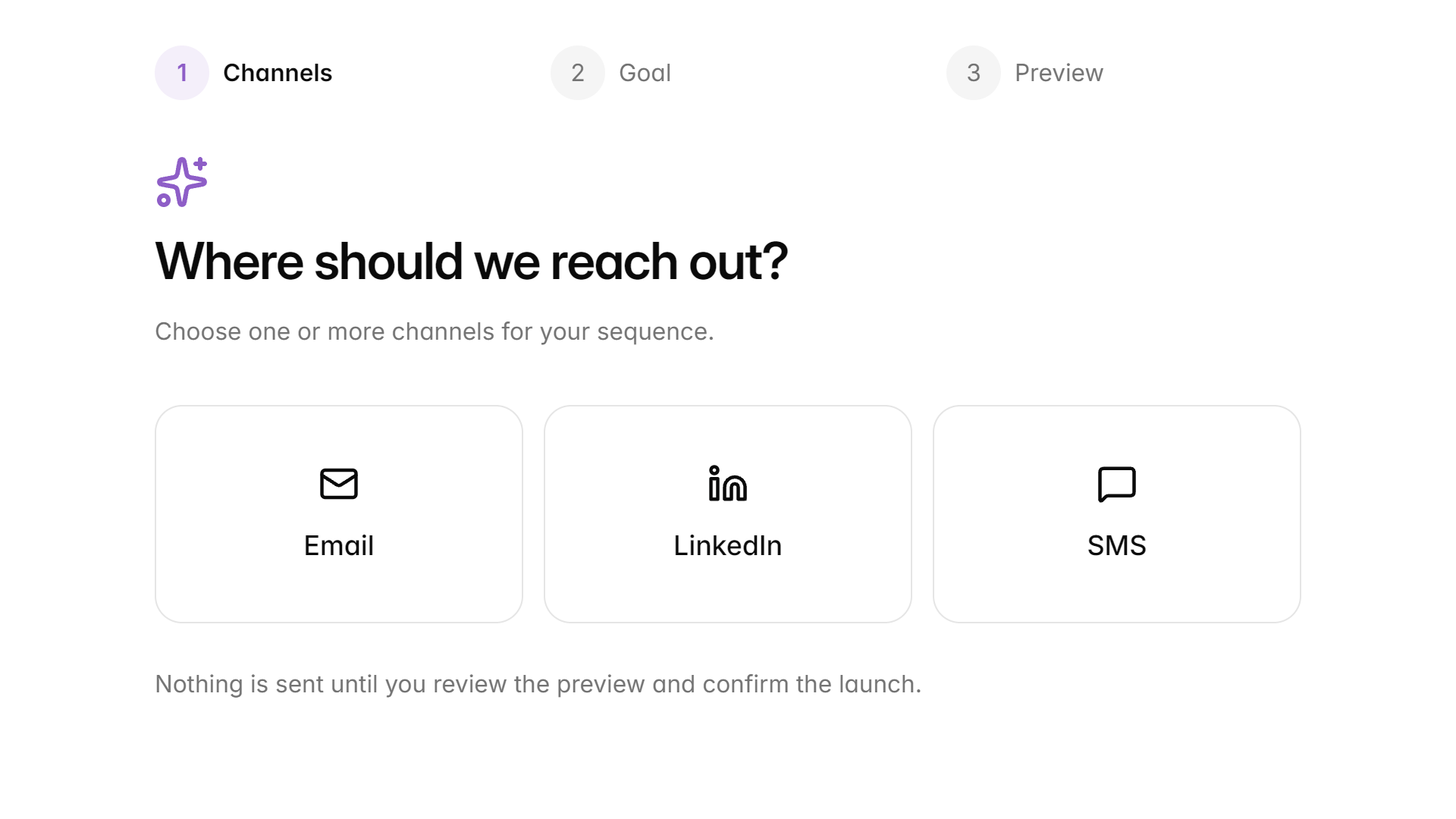
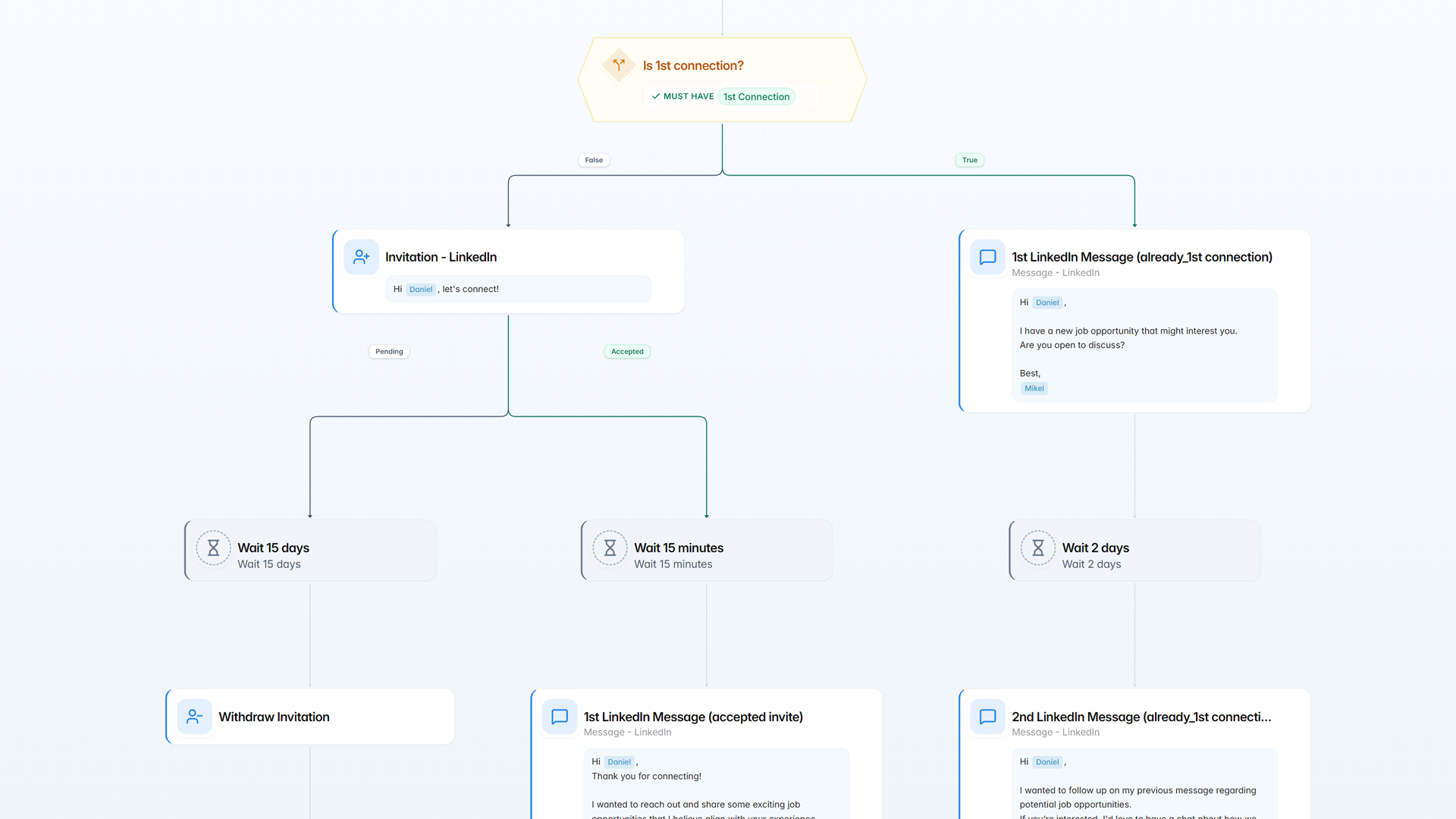
Grow your LinkedIn network on autopilot
Grow each consultant’s LinkedIn network and follow up automatically.
Next to email, SMS, and calls, also grow your LinkedIn network, automatically and in bulk, with:
- Automated bulk personalized connection requests
- Automated follow-up messages
- Custom messaging templates
- Smart fields that adapt to each profile
No more endless cut-paste-edit actions, Jobin automatically performs all the repetitive stuff.
Only fill out your messages once, or just save a template, and you're all done.
- Bulk inMail with custom templates and smart fields
- Bulk LinkedIn messaging with attachments
- Bulk withdraw invitations
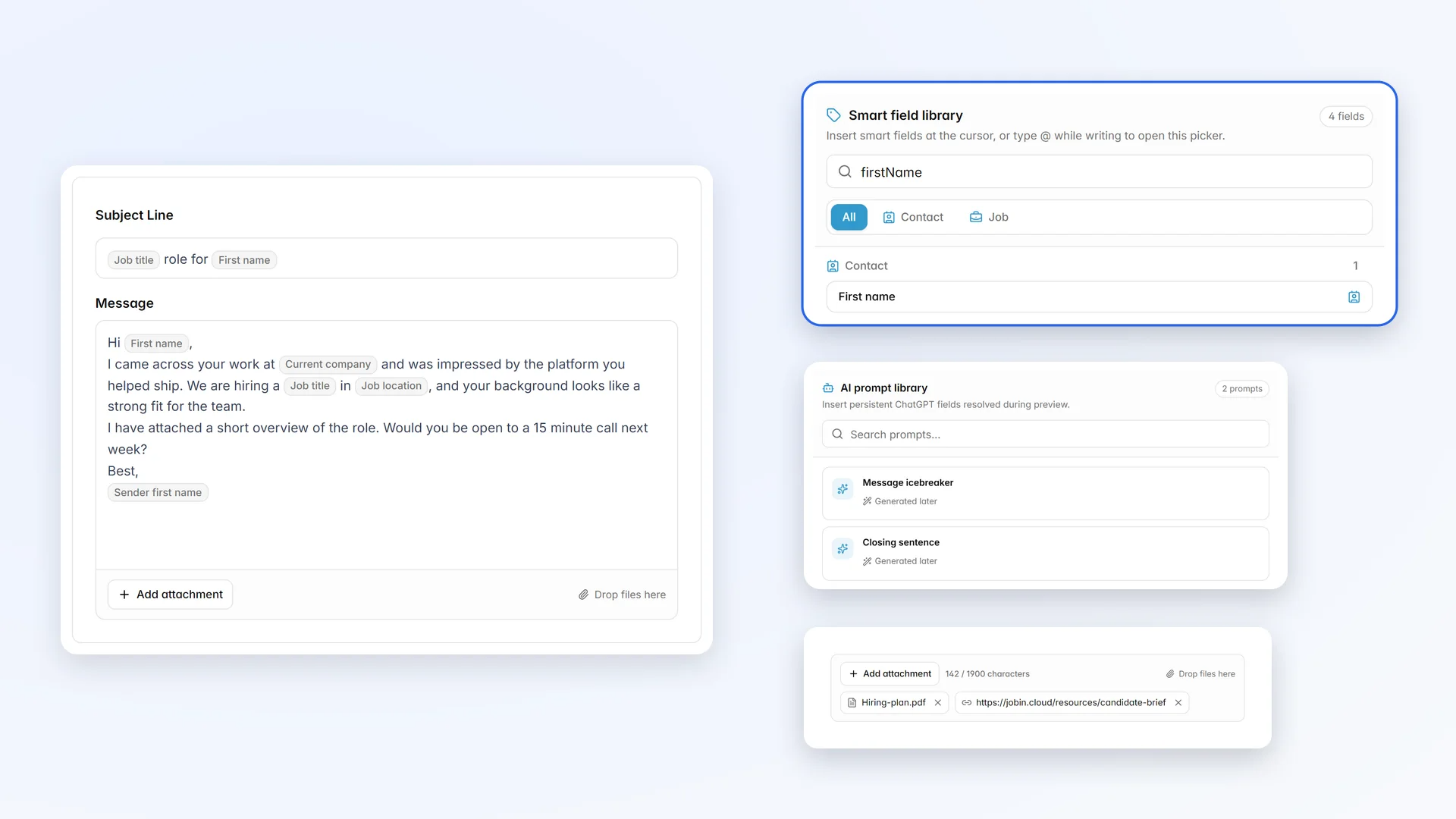
The email channel of your outreach
Send personalized job-spec emails to whole talent pools at once.
Aggregate, rank, filter and message all your Contacts with custom messaging templates while making use of smart fields, so that any message can sound fully personalized, even when sent to hundreds of people in bulk.
No more endless cut-paste-edit actions, Jobin performs all the repetitive stuff automatically, allowing you to finally focus, only on the contents and details of your messaging campaigns, without needing to repeat it for each individual recipient.
- Custom email and messaging templates
- Sender, recipient and job-spec Smart fields
- Attachments for job-specs, videos, images, and more
All this together with a multitude of auxiliary features such as
- Auto enrich contacts with a missing email address (find email addresses and other contact details)
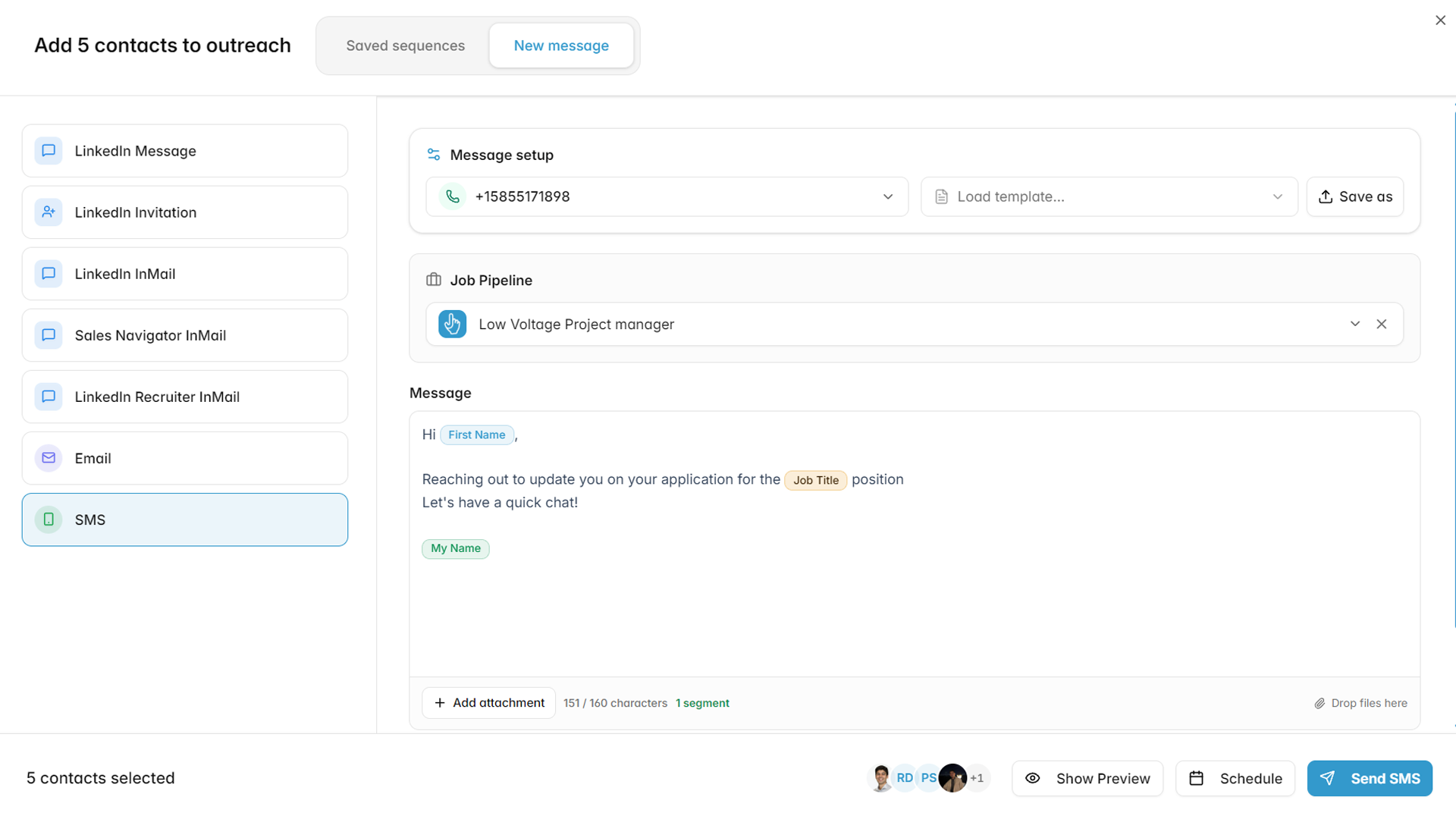
SMS outreach
Text candidates from an agency number as a step in your sequences.
Add a virtual phone number to Jobin and include SMS steps in your sequences, alongside email and LinkedIn.
- Mobile and toll-free numbers, with SMS and voice capabilities shown for each
- Guided US A2P 10DLC registration with The Campaign Registry
- SMS replies arrive in the unified inbox
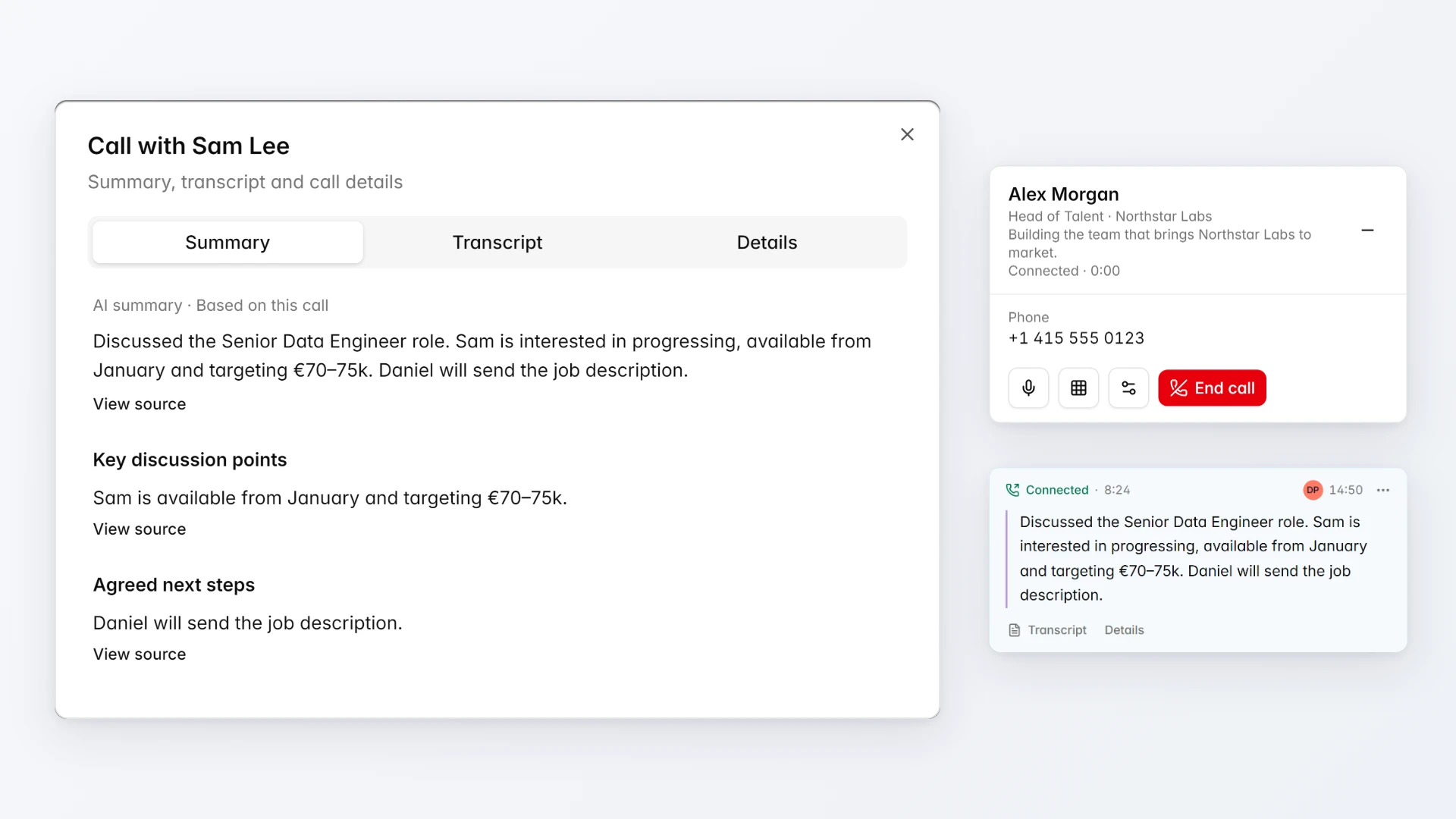
Dial-in calls with Jobin Voice
Give every consultant a business line, work through call lists, and keep an AI summary of each call on the record.
Call candidates and clients straight from their profile or a call task, and let Jobin write up the conversation for you.
- Call from the browser, or have Jobin ring your own phone first while the contact sees your business number
- Answer inbound calls on your business number, with a notification in Jobin and a custom away message
- Every call recorded and transcribed, with an AI summary, key discussion points, and agreed next steps on the timeline
- Record the outcome, schedule a callback, and auto-call the next contact in your call queue
- Already on Aircall? Connect it and call with your existing Aircall lines
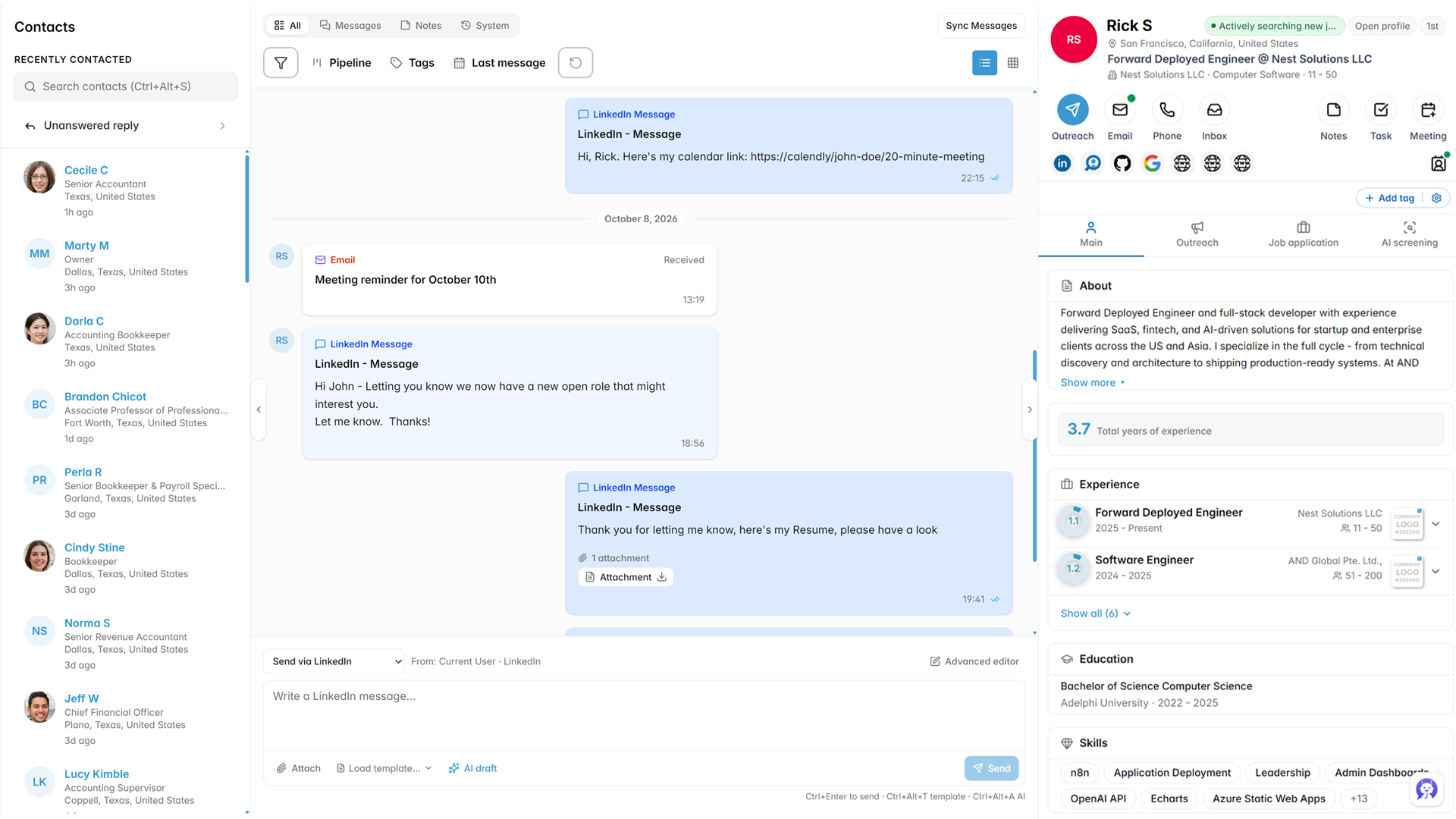
Unified inbox
Handle every candidate reply across email, LinkedIn, and SMS in one shared inbox.
Answer candidates with their recruiting context beside the conversation: pipeline stage, notes, tags, and full activity timeline.
- Replies labelled by intent, such as positive, not interested, or question
- AI-drafted replies based on the conversation, with your own direction
- Filter by pipeline, stage, tag, replies only, or date
- CC and BCC on one-off emails, attachments, and drafts that are never lost
- Share inbox access with teammates for each sender
- Separate candidate and client conversations
- Automatically unsubscribe contacts who reply STOP or unsubscribe, by email or SMS
Run the agency
ATS, CRM, and client delivery in one workspace.
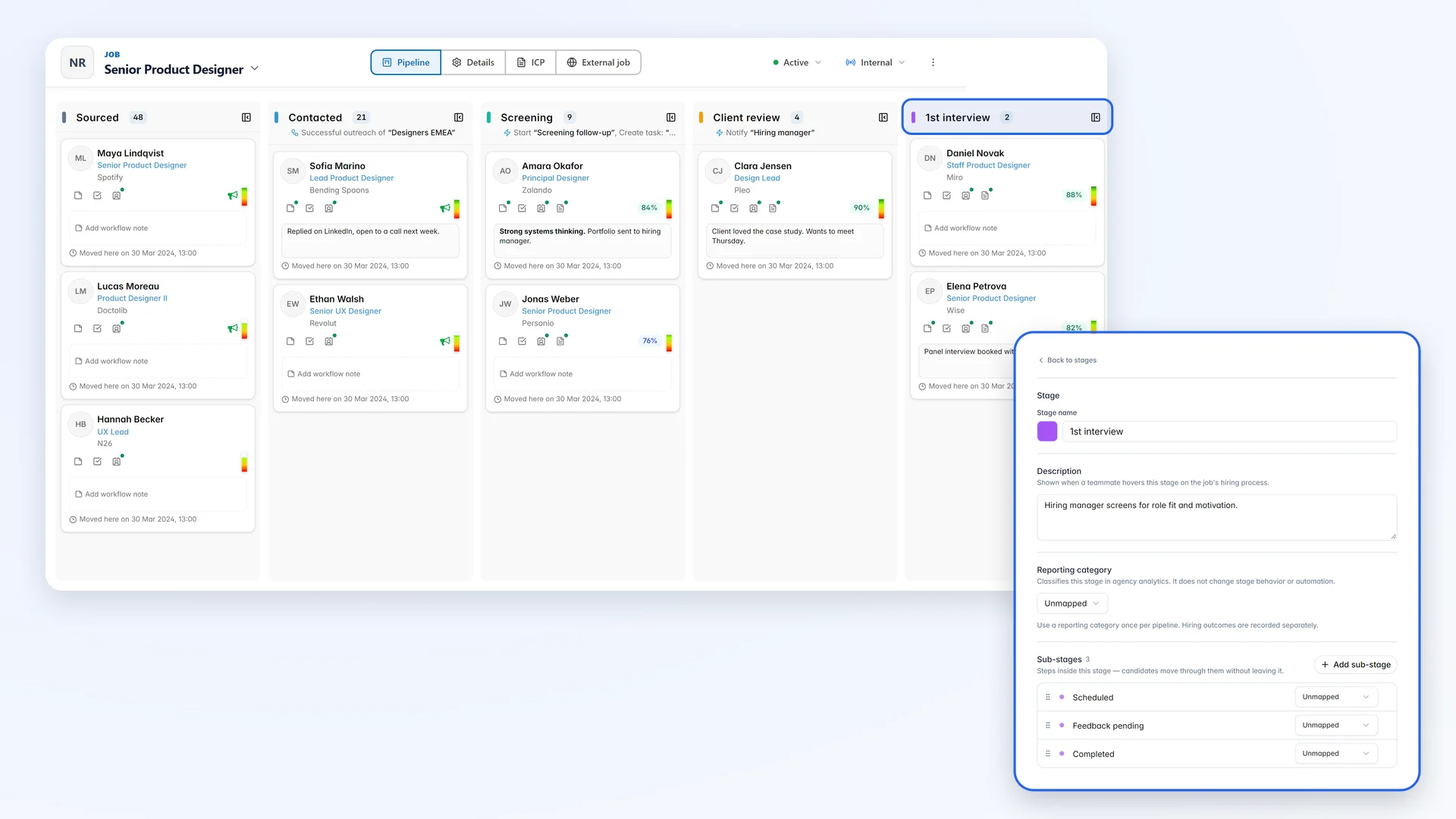
Fully customizable Recruiting workflow
Give every vacancy its own pipeline and see where each candidate stands across the desk.
Easily move your candidates along your recruiting workflow either in bulk through selections or just by drag-and-dropping.
Set up your ideal workflow according to your needs with:
- Unlimited numbers of stages
- Customizable stage names, color and description
- Alterable stage positions by drag and dropping
- Customizable stage sub-stages
- Customizable exit stages
On top of visual funnel overviews and kanban stage displays, everything can be saved into a template and filtered by stage, and sub-stages as well. You can also assign a dedicated contact ranking template for the workflow's "ideal candidate" to save time and have it automatically filter for you each time the pipeline is selected.
Sequences that fill your job pipeline
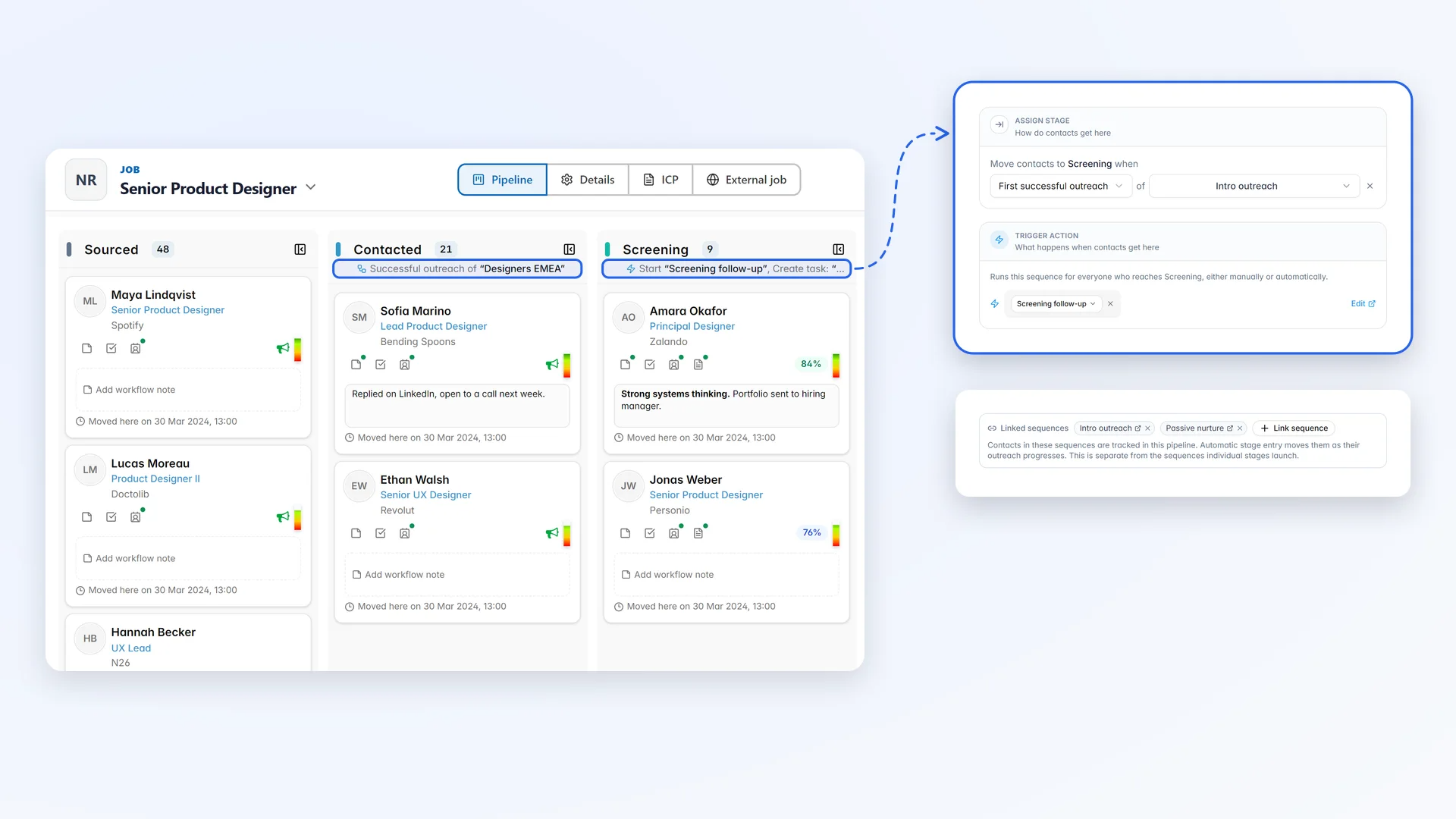
Keep vacancy pipelines current automatically as sequences assign, contact, and hear back from candidates.
Link a sequence to a job and its pipeline keeps itself up to date: everyone the sequence assigns, contacts, and hears back from is placed in the job's stages, with no cards to drag by hand.
- Move candidates automatically: give a stage an automation that fires on Contact assigned to sequence, First successful outreach, First human reply, or Interested. Candidates only ever move forward.
- Launch the next sequence on stage entry: when a candidate reaches a stage, by automation or by hand, Jobin starts the follow-up sequence you chose for it.
- Route replies by intent: AI reply identification can tag a contact, move them to a stage, or add them to another sequence.
Database sharing and structured teamwork
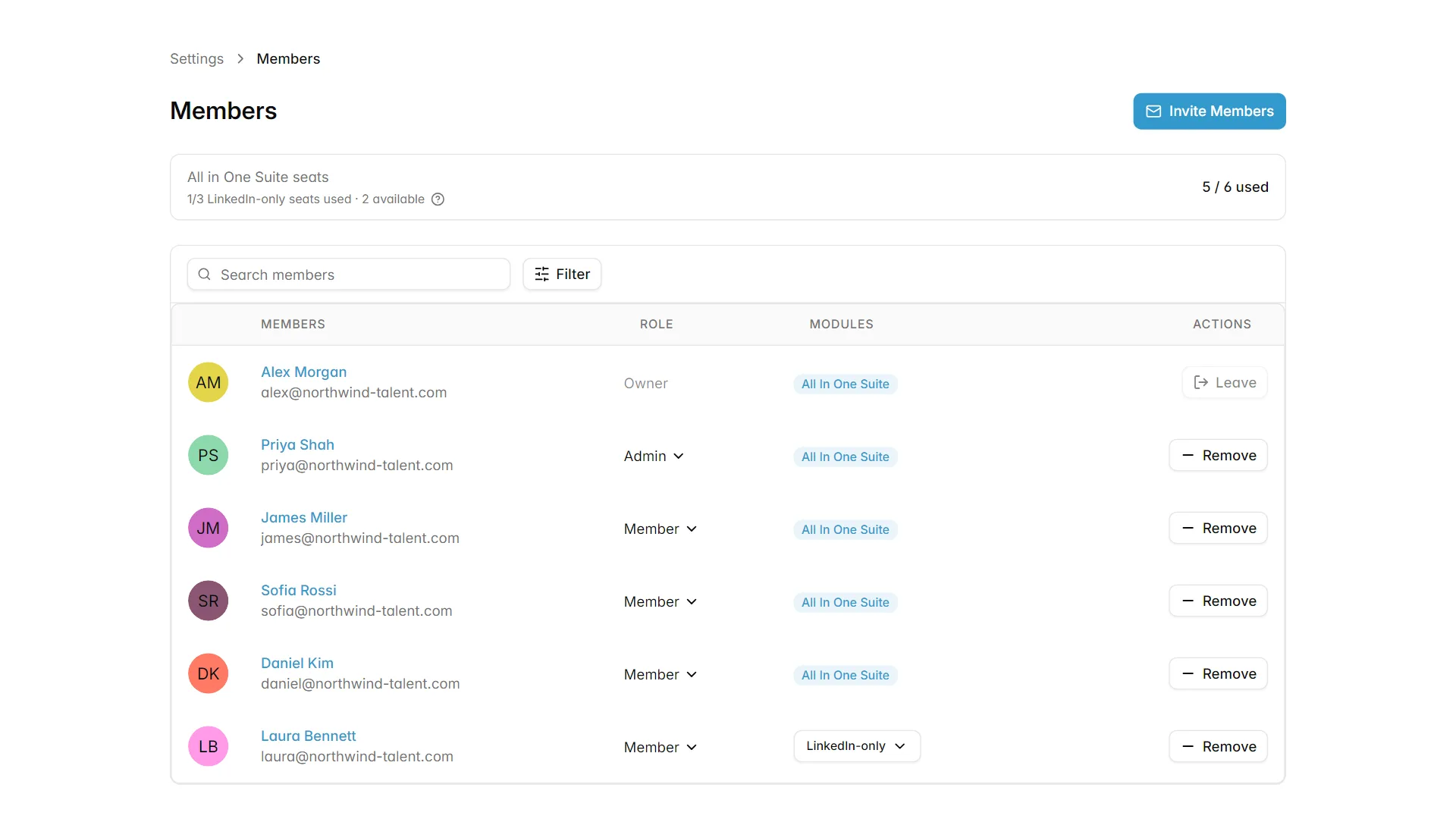
Organize consultants, desks, or offices into WorkGroups with their own shared data.
Organize your business activities and your team in dedicated workGroups with independent data content, participant members, logos, etc. Available to all users, no need to be a large corporation.
The trend shows that Recruiting is focusing more and more on single niches, independent and relatively small groups of experts. This is valid both in Recruiting Agencies and within HR departments in many Companies. Jobin supports this reality with a structured system of multiple workGroups each with
- separate datasets
- real-time data sharing between members
- events timeline of each member's activities
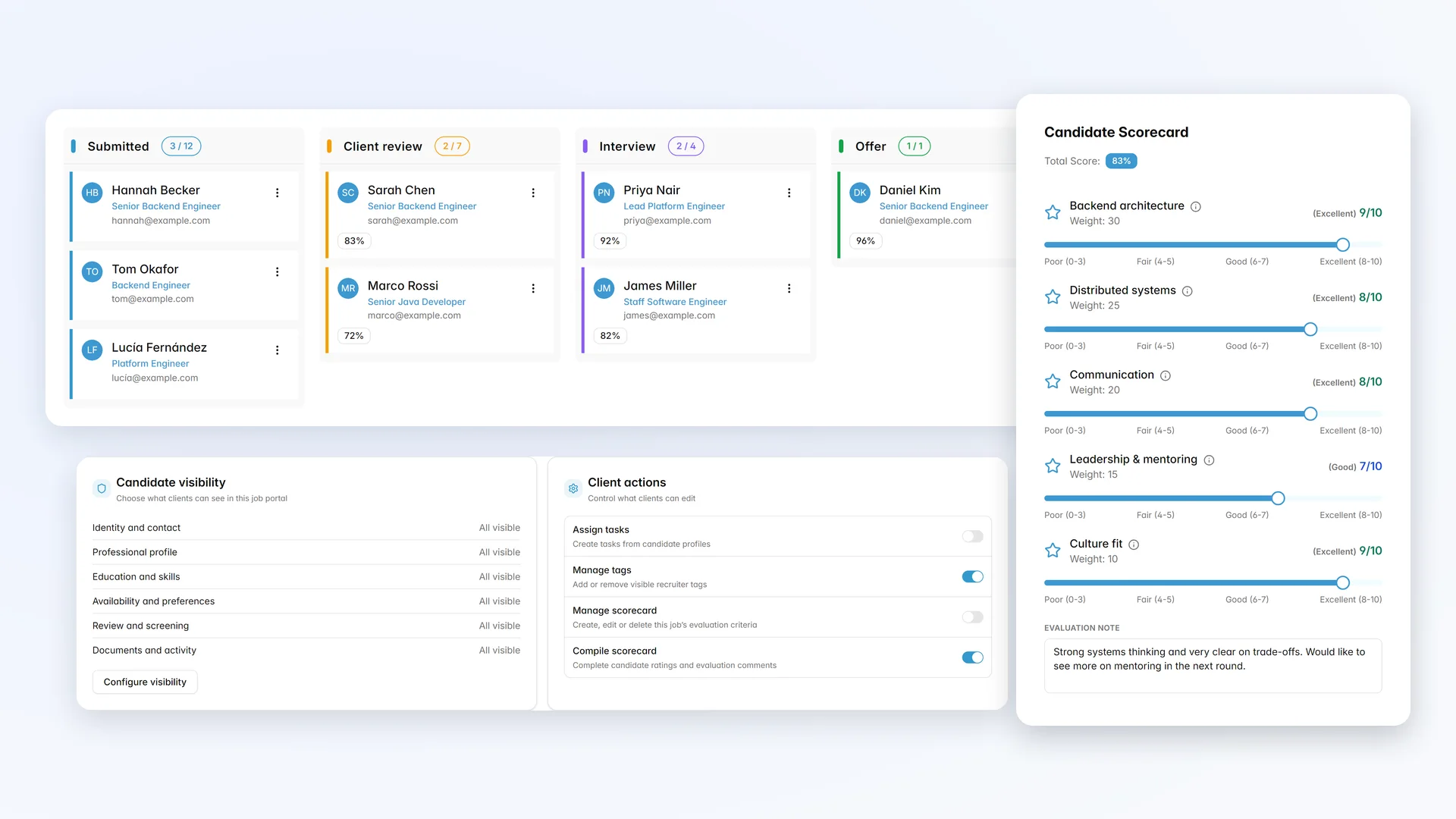
Client Portal and candidate scorecards
Send shortlists to clients and collect structured scorecards inside Jobin.
Give each client a secure view of their job's pipeline, so feedback arrives inside Jobin instead of scattered across emails and spreadsheets.
- Share a job pipeline with client users
- Collect weighted scorecards so every candidate is judged on the same criteria
- Control exactly which candidate details and notes each client can see, and keep names anonymous until you are ready
- Let clients approve or reject candidates, and on the jobs you choose, drag candidates between stages themselves
- Export candidate evaluations as PDF, Excel, or PowerPoint reports
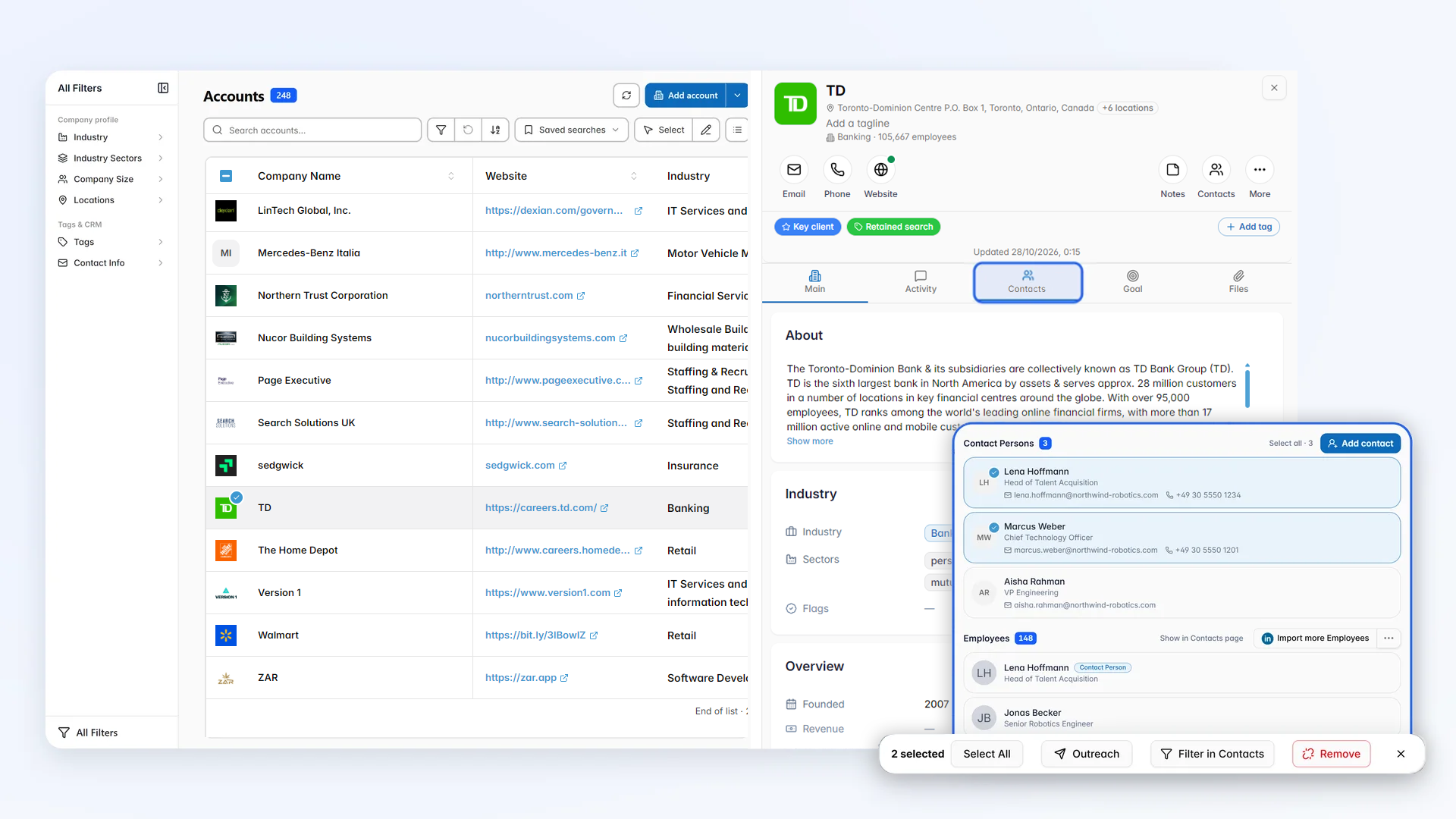
Client companies and accounts
Keep every client company, contact, and open job in one CRM record.
Keep every client company in one record: its contacts, open jobs, notes, documents, and activity.
- List, card, and split views with saved searches
- Import companies from a CSV file, with a smart link parser for websites
- One tag workspace for contacts, accounts, and jobs
Easily filter and shortlist your desired accounts and run targeted outreach campaigns on the linked contact persons or employees on any custom selected list of saved accounts.
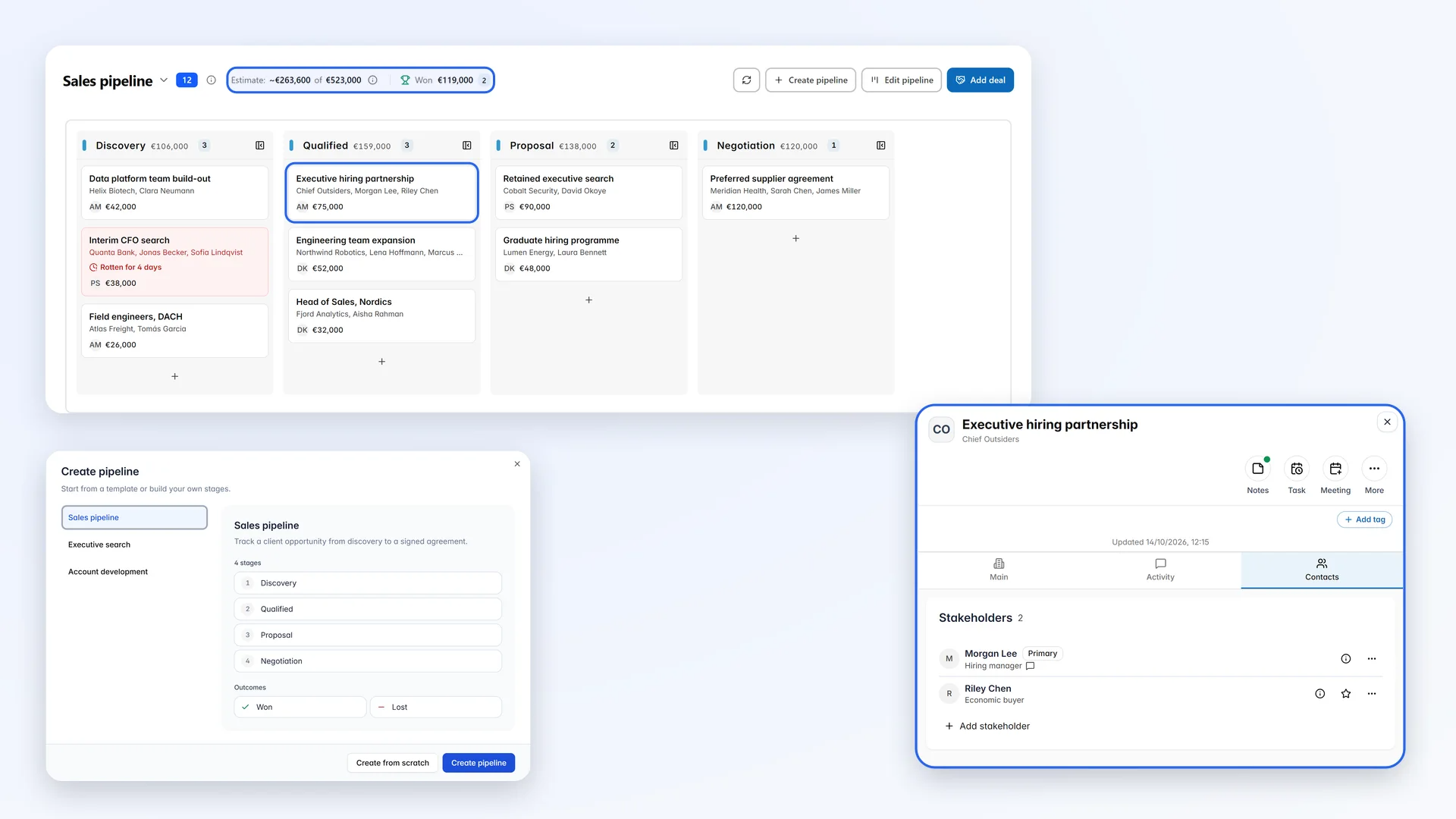
Deals, sales pipelines, and MPC marketing
Track new client opportunities on a sales pipeline built for agencies.
Track every client opportunity on a sales pipeline board, from the first conversation to the signed agreement.
- Start from a recruitment template: Lean, Consultative, Enterprise, or MPC, then adjust the stages and win probabilities
- A weighted forecast of your open pipeline, and alerts when a deal has gone quiet for too long
- Stakeholders with their roles, notes, tasks, and client meetings on every deal
- Create deals for a whole list of client contacts or accounts in one step
- Market your most placeable candidates (MPCs) to target companies, with each deal valued from the candidate’s salary and your fee
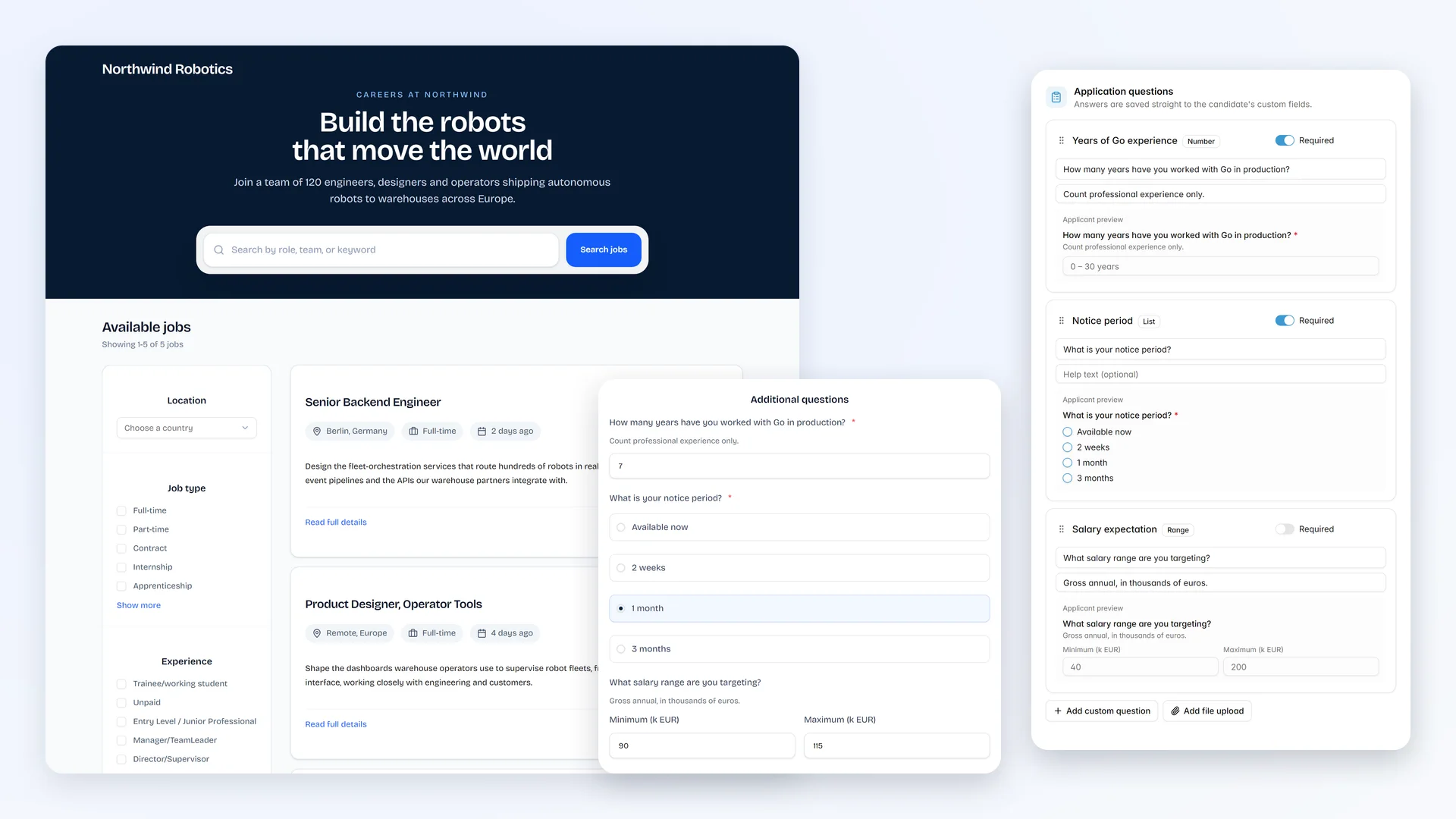
Career page, applications, and job boards
Publish your vacancies on a branded career page and job boards.
Create a job with AI, then publish it where candidates will find it.
- A branded career page for your open jobs
- Job-specific application questions, saved straight to reusable custom fields
- Post to job boards and social channels through the Broadbean integration
- Bulk CV and resume parsing for the applications you receive
Every application lands in the job pipeline, ready to screen and rank against the ideal candidate.
Interaction timeline
See which consultant contacted a candidate, when, and how, before anyone reaches out again.
Monitor any interaction you've taken with a specific contact, or a full activity board of everything set-up in a neat chronologically ordered timeline, from messaging and emailing to pipeline assignments.
It's hard to keep track of all your emailing and messaging campaigns on your own, let alone when working with a team. Jobin helps remind both you and your workgroup of
- what happened (email, invite, pipeline movement etc.)
- when it happened
- who was involved
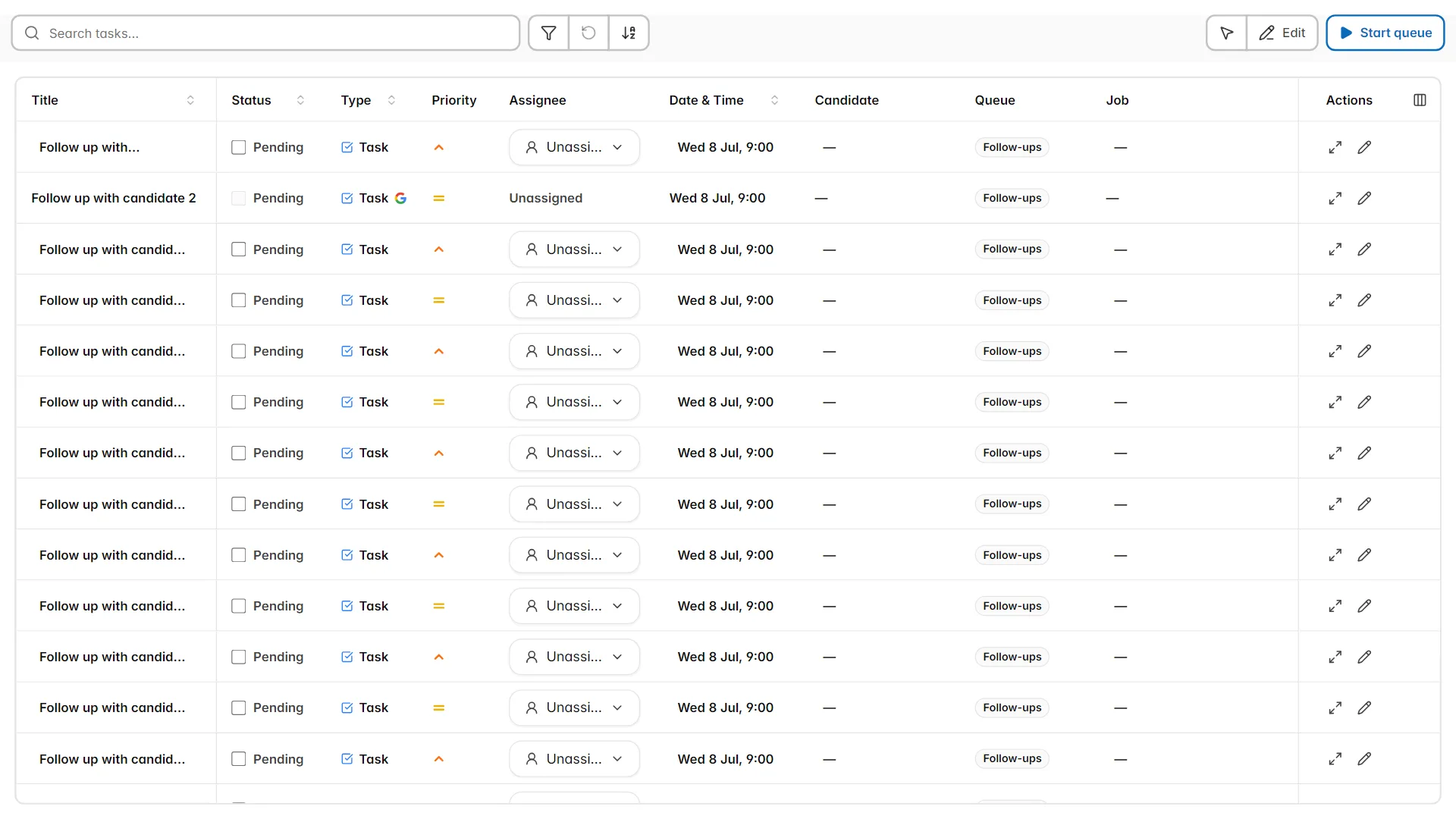
Tasks, task queues, and calendar
Give every consultant task queues for calls and follow-ups.
Create to-do and call tasks for any contact or job, group them into custom queues, and work through each queue one contact at a time.
- Command center, planner, week, and month views
- Connect Google or Outlook calendars and see your meetings next to your tasks
- Schedule candidate meetings with availability checked across your calendars
- See pending tasks as soon as you open a contact
- Assign a personalized task to up to 1,000 contacts at once, in a temporary call list that clears itself when you are done
- A countdown to the next task on every contact, job, account, and deal
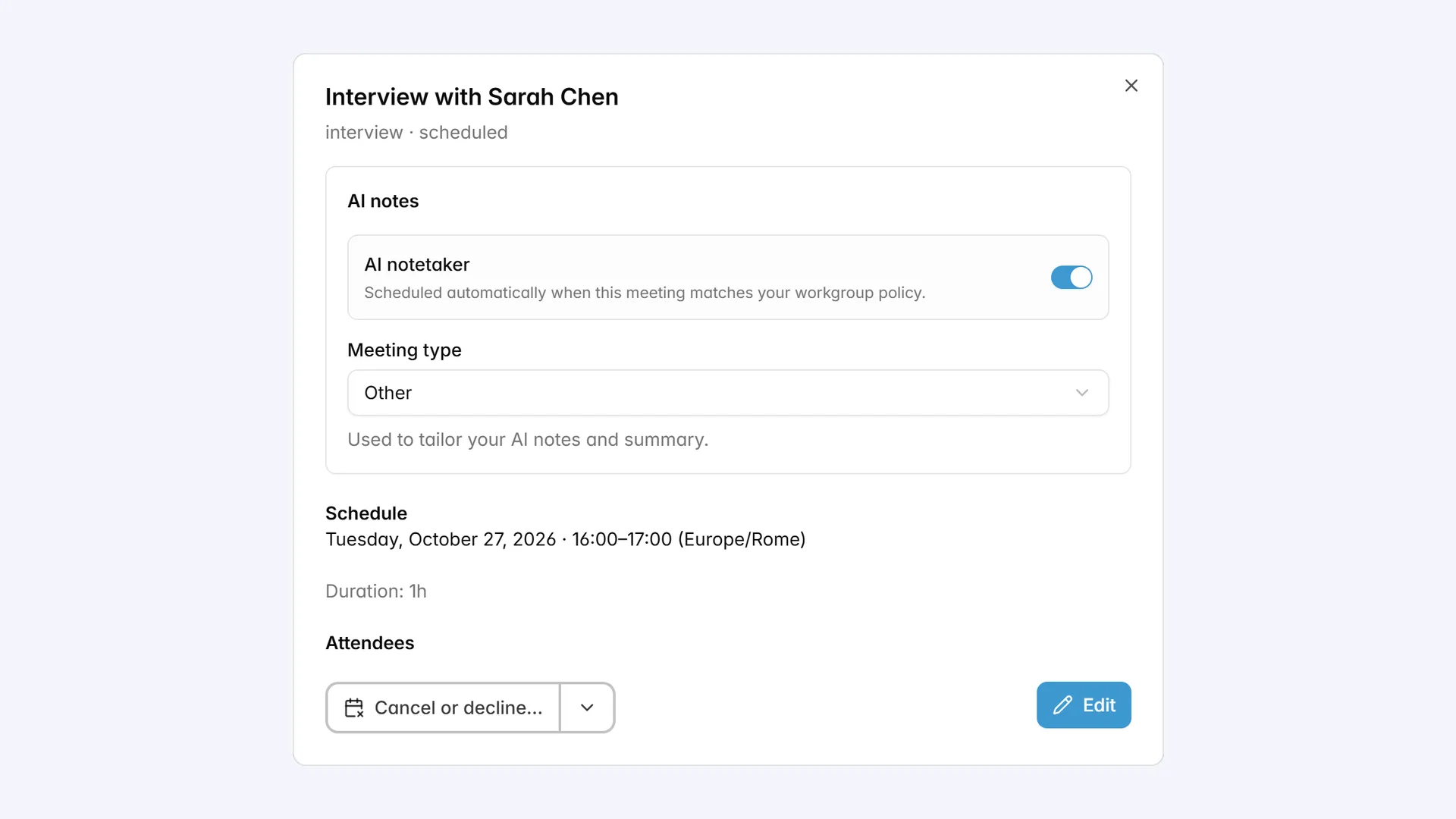
AI meeting notetaker
Record interviews and client calls, and let AI write the notes into the CRM.
Jobin's AI notetaker joins your Google Meet, Zoom, and Microsoft Teams meetings, records them, and writes the notes for you.
- Notes tailored to the meeting type: candidate screening, interview, client intake, client update, or business development
- A searchable transcript, with the evidence behind every point
- Suggested follow-up tasks, profile updates, and job criteria to accept in one click
- Ask a question about the meeting and get an answer from its transcript
- An AI meeting brief before the call, with talking points, attendee profiles, and your shared preparation notes
Automatic Profile updating
Keep your agency’s database current, so past candidates are ready when a new vacancy opens.
Having tens of thousands of Contacts, but never knowing whether any of them are actually hire-ready or not can get very time consuming and is no doubt a very frustrating experience for every recruiter.
Jobin can help get your database back in good shape with the press of a single button
- Automatic profile updating
never again work with outdated obsolete data - mass emailing
get your answers directly from the candidates themselves!
Data is kept healthy
Let Jobin clean and de-duplicate the database your whole team works from.
Recruiting databases quickly become obsolete without frequent maintenance and cleaning, but nobody has the time to do this properly.
Massive data is useless if not well structured, filterable, rankable and cleaned from duplication or redundancies.
Data scattered among different platforms and formats that cannot be aggregated, standardized and transferred, do not provide easy accessible information either.
Let Jobin.cloud do all that heavy lifting for you!
Database cleaning and de-duplication is all handled automatically, if contradictory data is found Jobin will let you decide what to keep and what to discard.
Measure and connect
See what each desk produces.
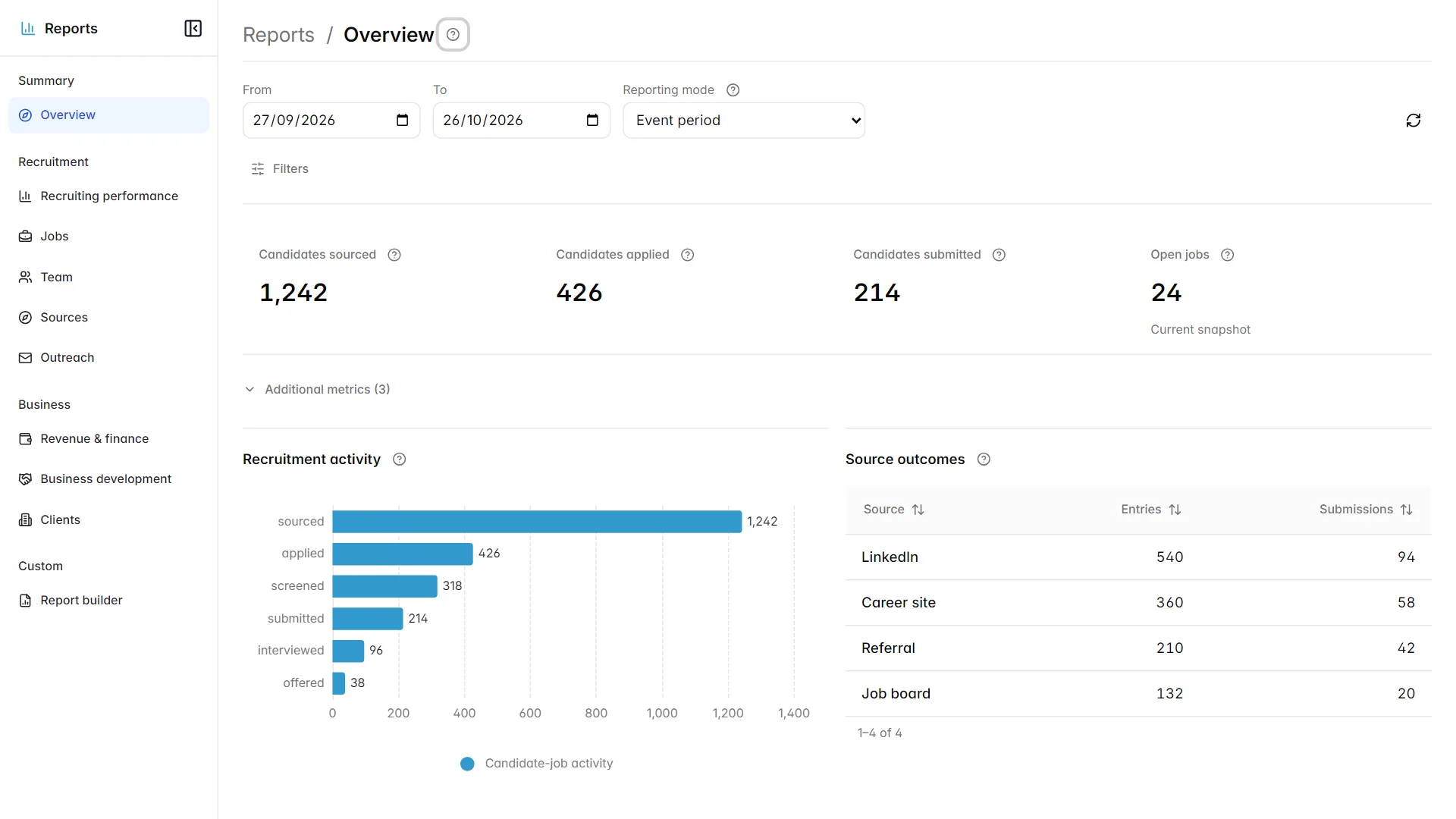
Recruiting, revenue, and client reports
Track submissions, placements, and revenue by consultant and client.
Ready-made reports answer the questions agencies ask every week.
- Recruiting performance: submissions, offers, placements, falloffs, and time to hire
- Jobs, team, and candidate source comparisons
- Revenue and invoices, business development opportunities, and client outcomes
- Contract staffing: active contractors, billings, margin, and utilization
Build your own reports with calculated metrics, share them with your team, and track goals on a leaderboard.
Operations monitor and safe sending limits
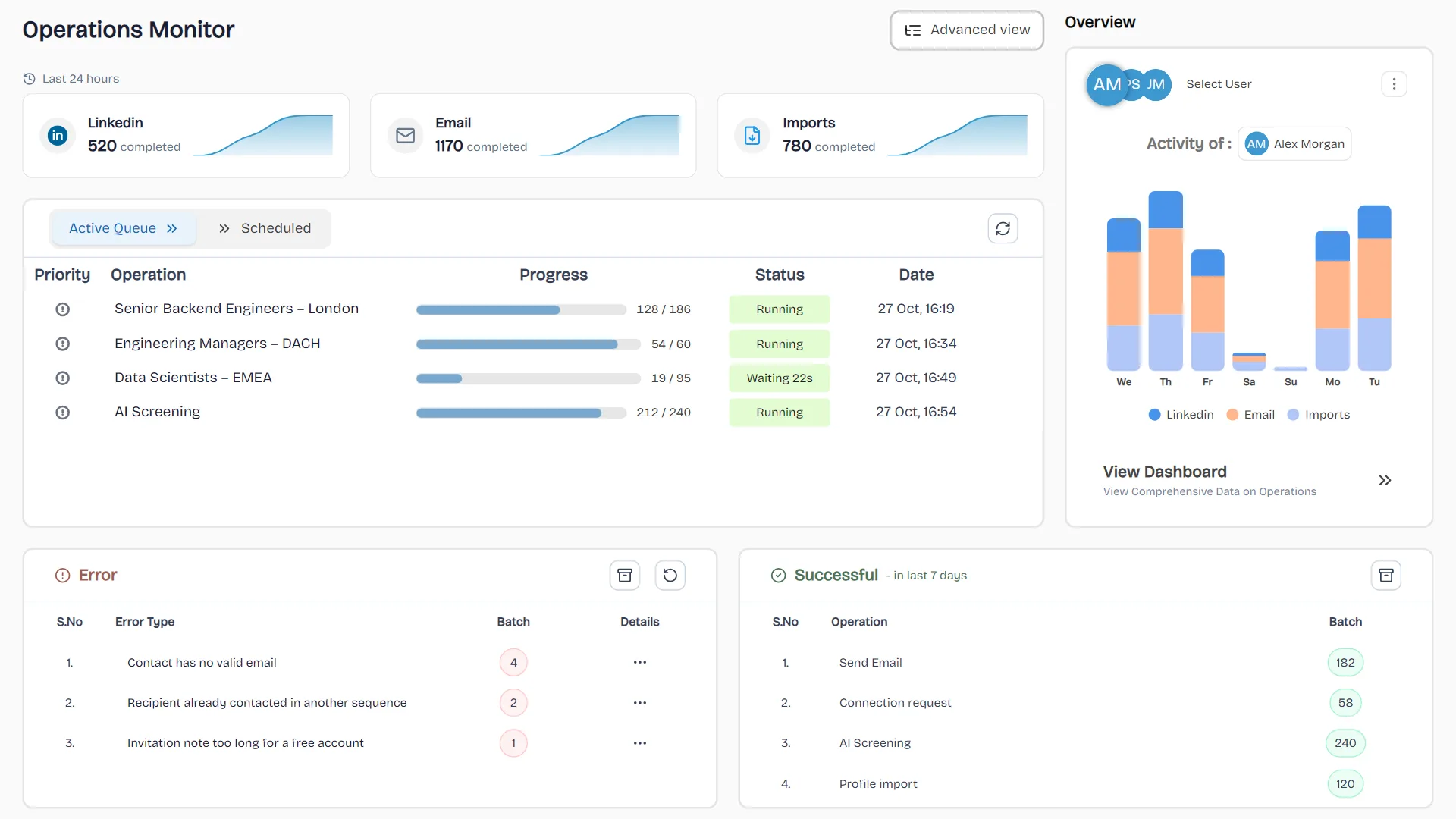
See every queued message and invitation across the team, so nothing fails silently.
Every message, invitation, and import Jobin performs is visible in the Operations monitor, so nothing fails silently.
- Retry or archive failed operations in bulk, with the reason for each failure
- Prioritize large operations so urgent outreach keeps moving
- Skip a sequence step for selected contacts, or edit pending messages in bulk
- Daily limits per account and operation type, operating hours, and human-like pacing
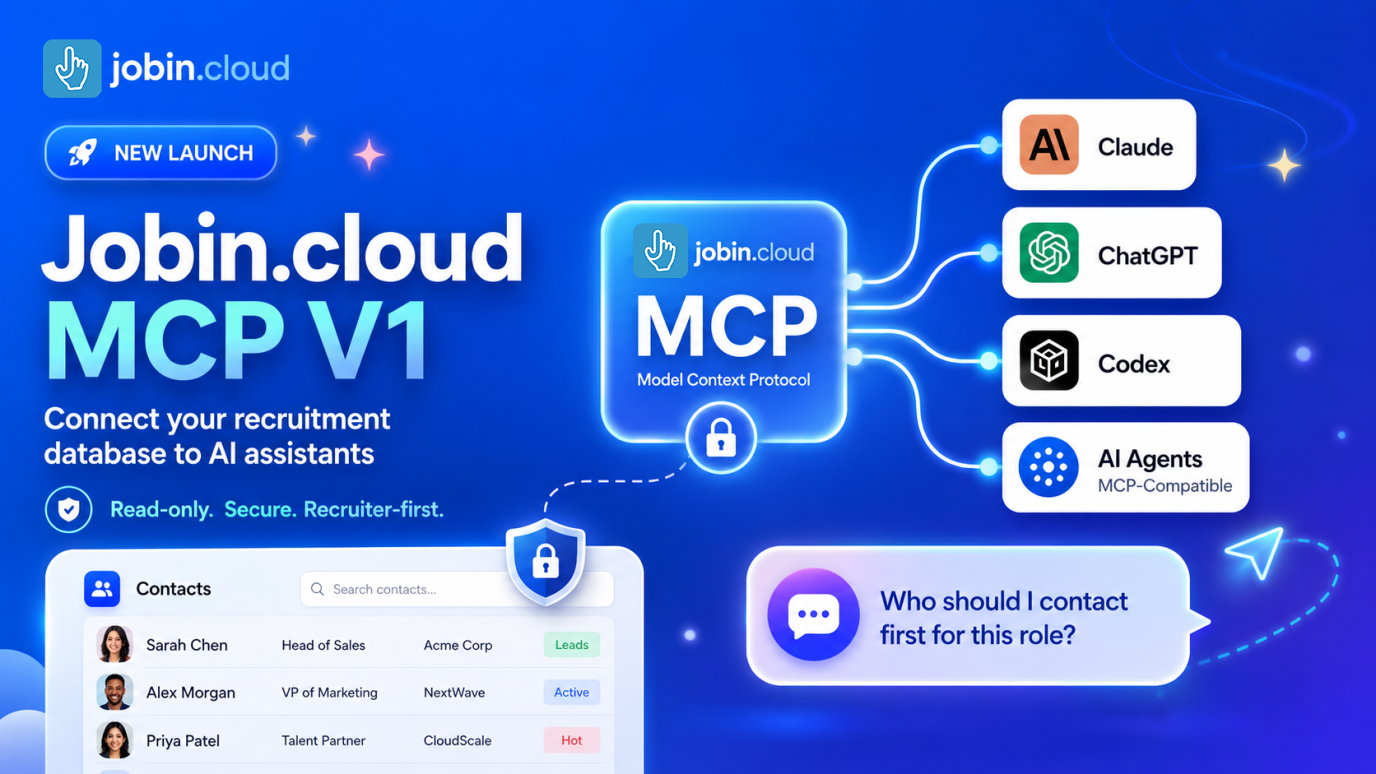
Jobin.cloud MCP for AI Assistants
Give your consultants’ AI assistants secure access to agency data.
Jobin.cloud MCP gives AI assistants secure access to the recruiting context they need to support sourcing decisions.
Instead of copying candidate data, notes, tags, outreach history, and pipeline activity into a chat manually, recruiters can connect an MCP-compatible assistant to Jobin.cloud and ask sourcing questions with workspace context available.
- Search contacts and profiles from AI assistants that support MCP
- Review candidate notes, tags, timelines, and sourcing context
- Prepare better shortlists and outreach with less copy-paste work
- Use read-oriented context access before taking action in recruiting workflows
Recruitment agency software questions
- What is recruitment agency software?
- Recruitment agency software is the platform a recruitment or staffing agency uses to run its desks: sourcing candidates, contacting them, tracking every vacancy’s pipeline, managing client companies and contacts, and reporting on placements. Jobin.cloud brings these together in one platform with AI sourcing, contact enrichment, multi-channel outreach, ATS pipelines, a client CRM, and a Client Portal.
- What should a recruitment agency CRM include?
- A shared, de-duplicated candidate database, a record for each client company with its contacts and open jobs, a sales pipeline for new client opportunities, a history of which consultant contacted each candidate, and reporting on submissions, placements, and revenue by consultant and client. Jobin.cloud includes each of these alongside its ATS pipelines.
- Can several consultants or offices share one workspace?
- Yes. Organize consultants, desks, or offices into WorkGroups with their own shared data, handle candidate replies in a shared inbox, and see who contacted a candidate, when, and how before anyone reaches out again.
- Can we migrate from our current ATS or spreadsheets?
- Yes. Import your old ATS exports and spreadsheets into one clean, shared database, upload inbound CVs in bulk, and let Jobin.cloud de-duplicate the records your team works from.
- How do clients review the candidates we submit?
- Send shortlists through the Client Portal, where clients review candidates and return structured scorecards inside Jobin.cloud instead of by email.

candidate record
AI Sourcing
Email/Phone Finder
AI Screening
Multi Outreach
Unified Inbox
Pipeline
Your next placement starts here
Less busywork.More placements.
Find the candidates others miss, engage them on every channel, and place them from one workspace.
Free to start, live in minutes.